
Need to check your website’s Domain Authority (DA) and Page Authority (PA) scores? We’ve tested 10 free DA PA checker tools to help you monitor your site’s SEO authority metrics accurately.
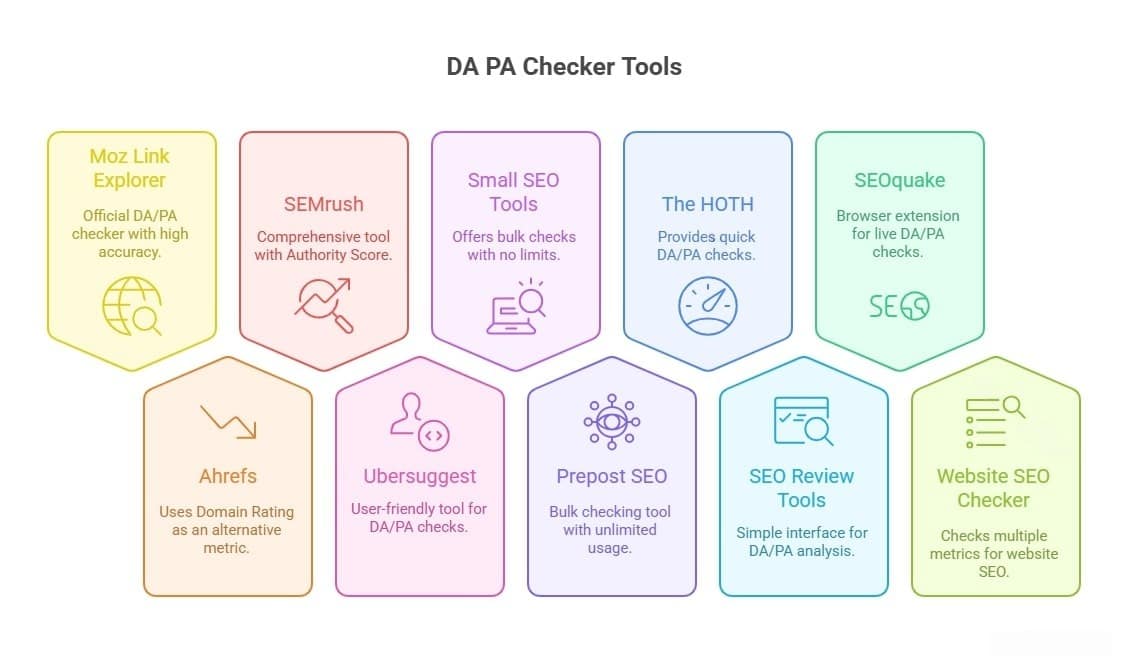
Whether you need Moz’s official DA checker, bulk DA checking for 100+ URLs, or real-time authority tracking, these tools provide accurate DA/PA scores from 0-100.
Digital marketing is a broad field, and for search engine optimization, individuals or organizations require lots of tools in terms of optimization.
There are various free and paid SEO tools available for different purposes, including link building, broken link detection, website authority checkers, keyword analysis, and ranking position tracking, among others.
When it comes to improving the search engine visibility of a website, two metrics that often come up are Domain Authority (DA) and Page Authority (PA).
DA and PA are numerical scores assigned to websites and individual pages, respectively, that indicate their potential to rank higher in search engine results pages (SERPs). In this article, we’ll take a closer look at what DA and PA are, how they are calculated, & why they matter.
Quick Picks for 2025:
- Best Overall: Moz Link Explorer (official DA/PA source, most accurate)
- Best for Bulk: Prepost SEO (check 100 URLs simultaneously)
- Best Alternative: Ahrefs Domain Rating (updated daily, 0-100 scale)
- Best Free: Small SEO Tools (unlimited checks, no registration)
In this comprehensive guide, you learn:
✅ Top 10 DA PA checker tools compared with ratings
✅ What Domain Authority means and how it’s calculated
✅ How to check DA/PA in 3 simple steps
✅ What constitutes a good DA score (industry benchmarks)
✅ Proven strategies to improve DA from 10 to 50+
✅ DA vs DR vs Authority Score comparison
✅ Free vs paid tool analysis
What is Domain Authority (DA) and Page Authority (PA)?

Domain Authority Explained
The Domain Authority (DA) is a search engine ranking score developed by Moz that predicts how well a website will rank on search engine result pages (SERPs). DA scores range from 1 to 100, with higher scores indicating a greater ability to rank. Think of DA as a website’s overall “reputation score” in Google’s eyes.
Key Points About DA:
- Created by Moz (not Google)
- Scale: 1-100 (higher is better)
- Updated monthly by Moz
- Based on multiple factors (40+ ranking signals)
- Comparative metric (relative to other sites)
- Predicts ranking potential, not guaranteed rankings
What Influences Domain Authority:
- Total number of backlinks – More quality links = higher DA
- Quality of linking domains – Links from high-DA sites matter more
- Diversity of link sources – Links from many different domains
- Link relevancy – Links from topically relevant sites
- Internal linking structure – How pages connect within your site
- Content quality and depth – Comprehensive, valuable content
- Social signals – Shares, engagement (indirect factor)
- Website age – Older established sites tend to have higher DA
- Technical SEO health – Site speed, mobile-friendliness, security
Important: Domain Authority is NOT a Google ranking factor. Google doesn’t use DA in its algorithm. However, DA correlates strongly with Google rankings because it measures many of the same factors Google considers.
Page Authority Explained
Page Authority (PA) is similar to Domain Authority but measures the ranking strength of individual pages rather than entire domains. PA also uses a 1-100 scale.
Key Differences: DA vs PA
- DA = Entire website or domain authority
- PA = Individual page/URL authority
- Homepage PA typically equals or is close to DA
- Internal pages usually have a lower PA than the homepage
- PA can vary widely across different pages on the same site
Example:
- Website DA: 45
- Homepage PA: 43
- Blog post PA: 28
- About page PA: 22
This shows that while the domain has decent authority (45), individual pages have varying authority levels based on their own backlinks and optimization.
How DA and PA Are Calculated
Moz uses a complex machine learning algorithm that considers:
1. Link Metrics (Most Important)
- Total number of linking root domains
- Quality and authority of linking domains
- Link relevancy and diversity
- MozRank (link popularity)
- MozTrust (link trustworthiness)
2. On-Page Factors
- Content quality and length
- Keyword optimization
- Internal linking structure
- User experience signals
3. Technical Factors
- Site speed and performance
- Mobile-friendliness
- SSL certificate (HTTPS)
- Site architecture
4. Social Signals (Minor)
- Social media mentions
- Brand searches
- Engagement metrics
Calculation Process:
- Moz’s web crawler (Rogerbot) indexes the web
- Data collected on links, content, and technical factors
- Machine learning model analyzes all signals
- Score calculated on logarithmic scale (1-100)
- Scores updated monthly in Moz’s index
Why Logarithmic Scale Matters:
- Going from DA 20 to 30 is relatively easy (2-3 months)
- Going from DA 30 to 40 is harder (6-12 months)
- Going from DA 60 to 70 is extremely difficult (years)
- Each 10-point increase requires exponentially more effort
Why should Domain Authority be checked?
The domain authority of a website gives a detailed report of its relevance for a specific search topic, so to learn about your website’s ranking ability, the domain authority must be checked.
People often like it when their website ranks higher on the search engine results page, so to make sure one gets a high rank, one should always check their domain authority.
Along with predicting the rank on SERPs, domain authority also includes other things such as the prestige of the website and its authors and the quality of the information presented.
How to Increase Website Domain Authority
There are lots of factors available in the digital marketing world to improve the DA of your website, but here we are sharing a few of them:
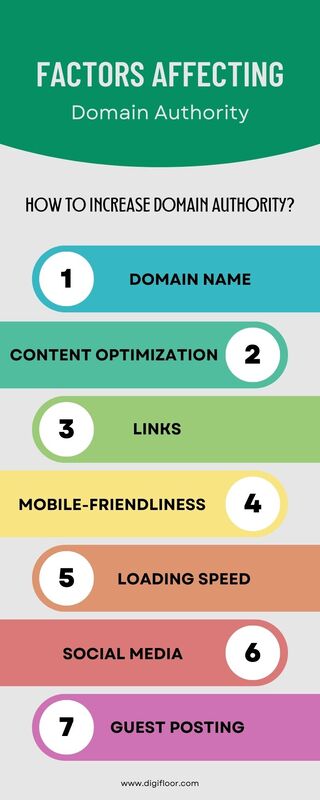
- Boost your content marketing strategy.
- Work on on-page & off-page activities.
- Outreach with niche bloggers.
- Build natural links for your website.
- Share your content on social media platforms.
- Make a mobile-friendly website.
- Remove spammy & bad backlinks.
- And more importantly, you should have patience.
Top 10 Best DA PA Checker Tools (Detailed Reviews):
These are some of the best tools available for domain authority checkers:
1. Moz Link Explorer – Best DA PA Checker Overall (Official Source):

 and Page Authority (PA) with these 10 free tools in 2025. Compare Moz, Ahrefs, SEMrush & more...)
The Moz Link Explorer is the official and most accurate DA PA checker because Moz created these metrics. As the source of Domain Authority and Page Authority scoring, Moz provides the definitive DA/PA data that all other tools attempt to replicate or approximate.
This is the best DA PA checker. The Moz Link Explorer is one of the cleanest SEO tools that helps get an analysis of the website which on many levels is very comprehensive for the URLs you enter. Apart from the free domain authority checker, Moz has many other features that help you improve website performance in the SERP. Add the Moz bar extension to the Google Chrome browser so that you can check anytime for free.
Key Features:
- Official DA/PA source – The metric creator, most accurate
- Comprehensive link data – See all backlinks, linking domains
- Spam Score – Identifies toxic or low-quality backlinks (0-17% scale)
- Link growth tracking – Monitor new and lost links over time
- Competitor analysis – Compare your DA with up to 5 competitors
- MozBar extension – Check DA/PA instantly while browsing
- Top pages report – See which pages have the highest PA on any domain
- Link metrics breakdown – MozRank, MozTrust, and more
Free Plan Includes:
- 10 URL queries per month
- Basic link metrics
- DA and PA scores
- Spam Score
- Top linking domains (limited)
- MozBar browser extension (unlimited)
Paid Plans:
- Standard: $99/month – 150 queries, 5,000 rows per query
- Medium: $179/month – 750 queries, 15,000 rows
- Large: $299/month – 2,000 queries, 30,000 rows
- Premium: $599/month – 15,000 queries, 60,000 rows
How to Use Moz DA Checker:
- Visit moz.com/link-explorer
- Create a free account (email required)
- Enter your website URL in the search box
- Click “Analyze Domain” button
- Wait 10-15 seconds for a comprehensive analysis
- View DA score (top left of report)
- Scroll down for PA, backlinks, and link metrics
2. Ahrefs Domain Rating Checker – Best Alternative Authority Metric:

It doesn’t measure “Domain Authority” per se—instead, they created their own metric called Ashref’s Domain Rating (DR), which serves the same purpose. Many SEO professionals actually prefer DR over DA because Ahrefs updates daily and has the most comprehensive backlink database in the industry.
An SEO tool that is built on a platform that can be completely relied on and which is free, helps any business understand the strength of a certain URL, along with the possible ranking of the URL on a search engine.
Key Features:
- Domain Rating (DR) – Ahrefs’ authority score (0-100 scale)
- Daily updates – Unlike Moz’s monthly updates, DR updates are constantly
- Largest backlink index – 16+ trillion backlinks crawled
- URL Rating (UR) – Page-level authority (like PA)
- Referring domains – Total domains linking to you
- Traffic estimation – Estimated organic search traffic
- Top pages – See which pages drive most traffic
- Keyword rankings – Track ranking keywords
Free Access:
- 3 free queries per day (no account needed initially)
- Basic DR and UR scores
- Backlink count
- Referring domains count
- Organic traffic estimate
Paid Plans:
- Lite: $99/month – 500 credits, 1 user
- Standard: $199/month – Unlimited, 1 user
- Advanced: $399/month – Unlimited, 3 users
- Enterprise: $999/month – Unlimited, 5 users
Domain Rating vs Domain Authority:
MetricDA (Moz)DR (Ahrefs)Scale1-1000-100UpdatesMonthlyDailyFocusLink quality + quantityBacklink profile strengthDatabaseSmallerLargest (16T+ links)Industry useTraditional standardGrowing preference
How to Use Ahrefs DR Checker:
- Visit ahrefs.com/website-authority-checker
- Enter your domain (no https:// needed)
- Click the “Check Authority” button
- Wait 5-10 seconds for analysis
- View DR score and key metrics
- Note: Limited to 3 free checks per day
3. SEMrush Authority Score – Best for Comprehensive SEO Metrics:

The SEMrush offers Authority Score (AS), their proprietary authority metric that considers more factors than traditional DA, including organic traffic data, on-page SEO, and user behaviour signals alongside backlink profile.
Key Features:
- Authority Score (AS) – Comprehensive 0-100 metric
- Backlink analysis – Total backlinks and referring domains
- Organic traffic estimate – Monthly visitors from Google
- Organic keywords – Number of ranking keywords
- Traffic value – Estimated worth of organic traffic
- Traffic trend – Growth or decline over time
- Competitor comparison – Compare up to 10 competitors
- Top pages – Highest-traffic pages listed
Free Access:
- 10 domain checks per day
- Basic Authority Score
- Limited backlink data
- Organic traffic overview
- Top 10 organic keywords
Paid Plans:
- Pro: $119.95/month – 3,000 reports/day, 1 user
- Guru: $229.95/month – 5,000 reports/day, 3 users
- Business: $449.95/month – 10,000 reports/day, 5 users
Authority Score Calculation: Unlike DA, which focuses heavily on backlinks, SEMrush Authority Score considers:
- Backlink quality and quantity (40%)
- Organic search traffic (30%)
- On-page SEO factors (15%)
- User behaviour signals (10%)
- Social signals (5%)
This makes AS a more holistic authority measurement.
How to Use SEMrush AS:
- Visit www.semrush.com/free-tools/website-authority-checker
- Enter your domain (no https:// needed)
- Click the “Check Authority” button
- Wait 5-10 seconds for analysis
- View AS score and key metrics
4. Ubersuggest – Best User-Friendly DA Checker:

The Ubersuggest, created by digital marketing expert Neil Patel, offers a user-friendly DA PA checker with additional SEO insights. It’s particularly good for beginners because of its simple interface and clear explanations.
Key Features:
- Domain Authority score – Moz-based DA metric
- Domain Score – Ubersuggest’s own authority metric (0-100)
- Backlink data – Total backlinks and referring domains
- Organic keywords – Keywords you rank for
- Organic traffic – Estimated monthly visitors
- Traffic value – Worth of organic traffic
- Top pages – Best-performing content
- SEO suggestions – Actionable improvements
Free Access:
- 3 searches per day
- Basic DA and Domain Score
- Limited backlink preview
- Top keywords overview
- Traffic estimates
Paid Plans:
- Individual: $12/month (annual) – 150 searches/day
- Business: $20/month (annual) – 300 searches/day
- Enterprise: $40/month (annual) – 900 searches/day
Note: These are annual pricing when paid yearly. Monthly plans cost more.
How to Use SEMrush AS:
- Visit https://app.neilpatel.com/
- Enter your domain (no https:// needed)
- Click the “Search” button
- Wait 5-10 seconds for analysis
- View DA score and key metrics
5. Small SEO Tools – Best Free DA Checker Without Limits:

The Small SEO Tools offers a completely free DA PA checker with no daily limits, making it one of the most accessible options. While not as accurate as Moz, it’s perfect for quick checks and doesn’t require registration.
Key Features:
- Unlimited free checks – No daily limits
- DA and PA scores – Both metrics provided
- Backlink count – Total backlinks shown
- Bulk checking – Check up to 5 URLs at once
- Fast results – Instant checks (5-10 seconds)
- No registration – Use immediately without an account
- Mobile-friendly – Works on all devices
Pricing:
- 100% Free – No paid plans
- No registration required
- Unlimited daily checks
- No hidden costs
Data Source: Small SEO Tools pulls DA/PA data from Moz’s API and other sources, so the scores should match Moz’s official numbers closely (though with slight delays in updates).
How to Use:
- No account or login needed
- Visit smallseotools.com/domain-authority-checker
- Enter your domain URL (up to 5 URLs)
- Complete simple CAPTCHA verification
- Click the “Check Authority” button
- View instant DA, PA, and backlink data
6. Prepost SEO – Best Bulk DA Checker:

The Prepost SEO is the best tool for bulk DA checking, allowing you to check Domain Authority for up to 100 URLs simultaneously—perfect for agencies, link builders, or anyone managing large lists of domains. Building a website with constant traffic flow and great ranking on Search Engine results is a constant struggle that includes many aspects like SEO strengthening, Authority Link Building, DA, and PA.
Key Features:
- Bulk DA PA checking – Up to 100 URLs at once
- Multiple metrics – DA, PA, MozRank, backlinks
- Export results – Download as CSV or Excel
- IP address – Shows the hosting IP for each domain
- Fast batch processing – Check 100 domains in 60 seconds
- Unlimited free checks – No daily limits
- No registration – Optional account creation
Pricing:
- 100% Free – Basic features
- Premium: $10/month – Ad-free, priority processing, API access
How to Use Prepost SEO Bulk DA Checker:
- Visit prepostseo.com/domain-authority-checker
- Enter up to 100 URLs (one per line)
- Complete CAPTCHA verification
- Click the “Check Authority” button
- Wait 30-90 seconds for batch processing
- View results in table format
- Export to CSV/Excel if needed
What Results Show:
- Domain Authority (DA) score
- Page Authority (PA) score
- MozRank
- Total backlinks
- IP address
- Country/hosting location
Use Cases:
- Link Prospecting: Check the DA of 100 potential link targets at once
- Competitor Analysis: Batch check all competitors simultaneously
- Expired Domain Hunting: Verify DA of domain lists before purchasing
- Client Reporting: Quickly gather DA data for multiple client sites
- Link Portfolio Audit: Check DA of all sites linking to you
7. The HOTH Domain Authority Checker – Best for Quick Checks:

HOTH’s DA checker is a simple, fast tool for quick Domain and Page Authority checks without complicated features or registration requirements.
Key Features:
- DA and PA scores – Both metrics provided
- Backlink count – Total backlinks shown
- Instant results – 5-second check time
- Bulk checking – Up to 10 URLs simultaneously
- Completely free – No paid plans
- No registration – Use immediately
- Mobile-optimized – Works on phones/tablets
Pricing:
- 100% Free – No limits or paid upgrades
Perfect for quick, simple checks when you don’t need comprehensive analysis. It’s fast, free, and straightforward—ideal for casual users.
How to Use:
- Visit https://www.thehoth.com/domain-authority-checker
- Enter your domain URL
- Click the “View Moz metrix” button
- View instant DA, PA, and backlink data
8. SEO Review Tools – Best Simple Interface:

The SEO Review Tools offers a minimalist DA PA checker with a focus on simplicity and ease of use.
Key Features:
- Responsive design – Mobile-friendly
- DA, PA, MozRank – Multiple Moz metrics
- Backlink overview – Total links and domains
- Fast checking – Instant results
- Free unlimited – No daily limits
- No registration – Optional account
How to Use:
- Visit https://www.seoreviewtools.com/website-authority-checker/
- Enter your domain URL
- Click the “Perform Check” button
- View instant DA, PA, and backlink data
9. SEOquake Browser Extension – Best for Live DA Checking:
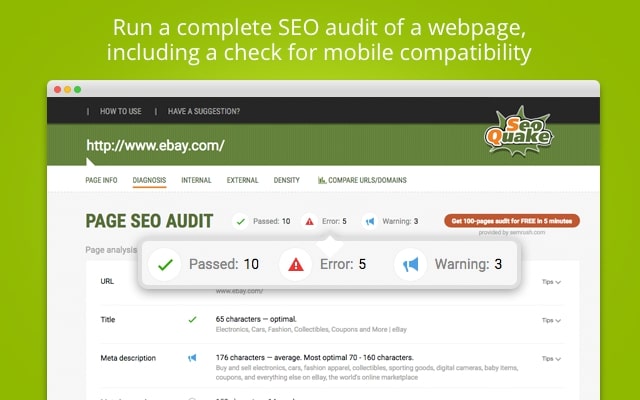
The SEOquake is a browser extension that displays DA, PA, and other SEO metrics directly on any website you visit—no need to use separate checker tools.
Key Features:
- Completely free – No paid version
- Browser extension – Chrome, Firefox, Opera, Edge
- Live DA/PA display – See metrics while browsing
- SERP overlay – DA/PA shown in Google search results
- Multiple metrics – Alexa Rank, backlinks, age, etc.
- SEO audit – On-page SEO analysis
- Export data – CSV export functionality
How to Use:
- Install the SEOquake extension from the Chrome Web Store
- Visit any website
- Look at the top toolbar – DA/PA displays automatically
- Click the extension icon for detailed metrics
- View SEO metrics without leaving the page
10. Website SEO Checker – Best for Multiple Metrics
The Website SEO Checker provides DA and PA checking along with additional SEO metrics in a single comprehensive report.
Key Features:
- DA, PA, MozRank – Full Moz metrics suite
- Backlink analysis – Total links and referring domains
- Alexa Rank – Global and country rank
- Indexed pages – Pages in Google index
- Social metrics – Facebook, Twitter shares
- Page speed – Load time analysis
- Free unlimited – No daily limits
- Bulk checking – Up to 5 URLs at once
Pricing:
- 100% Free – All features included
How to Use:
- Visit https://websiteseochecker.com/domain-authority-checker
- Enter your domain URL
- Click the “Check Authority” button
- View instant DA, PA, and other data
Common DA Checking Mistakes to Avoid
Mistake 1: Obsessing Over DA Score
The Problem: Many website owners become fixated on their DA number, checking it daily and panicking over small fluctuations.
Mistake 2: Comparing DA Across Different Tools
The Problem: Using multiple tools and getting confused when numbers don’t match.
Mistake 3: Buying Backlinks to Increase DA
The Problem: Purchasing backlinks from link sellers, thinking it’s a shortcut to higher DA.
Mistake 4: Ignoring Page Authority (PA)
The Problem: Focusing only on Domain Authority and neglecting Page Authority.
Mistake 5: Not Checking Competitor DA
The Problem: Checking your own DA in isolation without a competitive context.
Mistake 6: Expecting Immediate DA Increases
The Problem: Building 10 backlinks and checking DA the next day, expecting to see improvement.
Mistake 7: Using Only Free Tools for Professional Work
The Problem: SEO agencies or professionals relying solely on free DA checkers for client work.
Mistake 8: Neglecting Toxic Backlinks
The Problem: Focusing only on building new links, ignoring harmful links pointing to your site.
Mistake 9: Thinking DA = Rankings
The Problem: Believing that increasing DA automatically improves Google rankings.
Mistake 10: Checking DA Too Frequently
The Problem: Checking DA multiple times per week or even daily.
Final Thoughts: Use DA as a Guide, Not a Goal
Domain Authority is a valuable metric for assessing website authority and tracking SEO progress, but it should never become your primary focus. Remember that DA is a Moz-created metric, not a Google ranking factor—your ultimate goal is ranking well in Google search results and driving organic traffic, not achieving a specific DA number.
Key Takeaways:
✅ DA predicts ranking potential, but doesn’t guarantee rankings
✅ Check DA monthly, not daily (it only updates monthly anyway)
✅ Focus on the factors that improve DA: great content + quality backlinks
✅ Compare your DA to direct competitors, not arbitrary targets
✅ Track DA trends over 6-12 months, not month-to-month fluctuations
✅ Use free tools for casual checking, paid tools for professional work
✅ Remember, PA matters too for individual page rankings
✅ Be patient—meaningful DA growth takes 6-12+ months
The websites that succeed long-term don’t obsess over DA scores; they consistently create valuable content, build genuine relationships that naturally earn quality backlinks, provide exceptional user experiences, and let DA increase as a byproduct of good SEO practices.
Use the DA PA checker tools in this guide to monitor your progress, identify opportunities, and stay competitive—but invest your time and energy in the activities that actually drive business results: creating content people love, building links ethically, and delivering value to your audience.
FAQs :
DA measures the ranking potential of your entire website, while PA measures the strength of individual pages. DA is your site’s overall reputation (1–100), and PA shows how strong each page is based on backlinks and optimization.
Moz updates DA about once per month. Even if you build new backlinks, changes appear only after the next Moz index refresh, usually every 30 days.
Yes. You can check DA for free using tools like Moz Link Explorer, MozBar, Small SEO Tools, Prepost SEO, or The HOTH. Moz offers 10 free checks per month, while other tools allow unlimited free lookups.
No. Google does not use DA in its algorithm. DA is a Moz metric that estimates ranking potential, but improving DA usually aligns with good SEO practices that help real rankings.
New sites typically start with a DA of 1–10. After consistent SEO work, reaching DA 20–30 within a year is a healthy goal. Growth slows as scores get higher, so focus on steady improvement over time.
Earn high-quality backlinks, publish valuable content, guest post on reputable sites, remove toxic links, and improve internal linking. Be patient—DA growth usually takes a few months.
Yes. Use tools like Moz Link Explorer, MozBar, or Prepost SEO to compare DA scores with competitors and identify link-building opportunities.