

Smartphones have become more powerful than ever, but one thing users still struggle with is battery life. Bigger screens, constant internet use, background apps, and heavy multitasking drain power faster than most of us expect.
Even though Android offers built-in battery optimisation, many users look for battery saver apps to extend usage, reduce background activity, and keep their phones running longer throughout the day. That’s why having the right battery-saving tool can still make a noticeable difference in 2026.
The latest Smartphones with incredible and convenient features are in no way comparable to traditional mobiles. But the latest phones get defeated when it comes to battery performance. Smartphones nowadays are available in different sizes as well as specifications. 4G/5G technology, Dual SIMs, higher storage capacity, impressive picture quality, and excellent sound quality with several other multimedia features drain out the battery power. In order to overcome that we need a Battery Saver App.
We use apps for nearly everything, from setting alarms to planning our holiday trips to make them the most cost-effective. As a matter of fact, people have also found easy ways to make money online using applications.
Though we are witnessing the fast progress of technology, but yet we are still unable to find the key to enhancing battery health, performance, and life. Today, a Smartphone’s battery maximum lasts for one day. Several apps are also released every day, but most of the apps consume high battery life, draining the charge. Along with this, many apps utilise the phone’s resources like CPU, Display, etc.
If you are worried about the apps that drain battery power, you can use the battery saver apps. It is a big challenge to pick the right and good battery saver app. On this list, you can find the best battery saver apps that make your battery last longer (not fast-charging apps) for Android phones along with their feature description.
| Smart Action Camera | Total Downloads | Total Number of People who Rated the App | Rating | Google Play Store |
|---|---|---|---|---|
| Greenify | 10 Million | 297,765 | 4.4 | Install |
| Power Battery | 50 Million | 798,177 | 4.5 | Install |
| Power Clean (Optimize Cleaner) | 100 Million | 2,575,557 | 4.6 | Install |
| Accu Battery | 5 Million | 127,252 | 4.7 | Install |
| Battery Doctor (power Saver) | 100 Million | 8,183,467 | 4.5 | Install |
| Battery HD | 10 Million | 522,357 | 4.6 | Install |
| Avast battery saver | 10 Million | 2,58,612 | 4.4 | Install |
Do Battery Saver Apps Really Work?
Many users often wonder whether battery saver apps truly work. The simple answer is: yes, but with limitations.
These apps can help by reducing background processes, controlling high-drain activities, clearing unnecessary tasks, and giving you better insight into how your battery is being used. They can also automate power-saving modes that you would otherwise manage manually.
However, battery saver apps are not magic solutions. They can improve battery life only if you use them correctly and choose apps that genuinely optimise performance rather than add to the load. Think of them as helping tools, not complete replacements for good battery habits.
Top Rated Battery Saver Apps for Android Devices
1. Greenify – Best Battery Saver App for Android 2026:

- Greenify is the best battery saver app available for Android devices.
- It is a free app that identifies the power-consuming apps running abnormally in the background.
- The app optimizes background processing as well as memory use.
- Greenify app forces the apps into hibernation mode when not in use.
- This extreme battery saver app accelerates the performance of the device preventing battery consumption.
- It is light on CPU and RAM.
- It doesn’t save the personal information of the users.
2. Power Battery – Best Battery Optimizer & Life Saver:
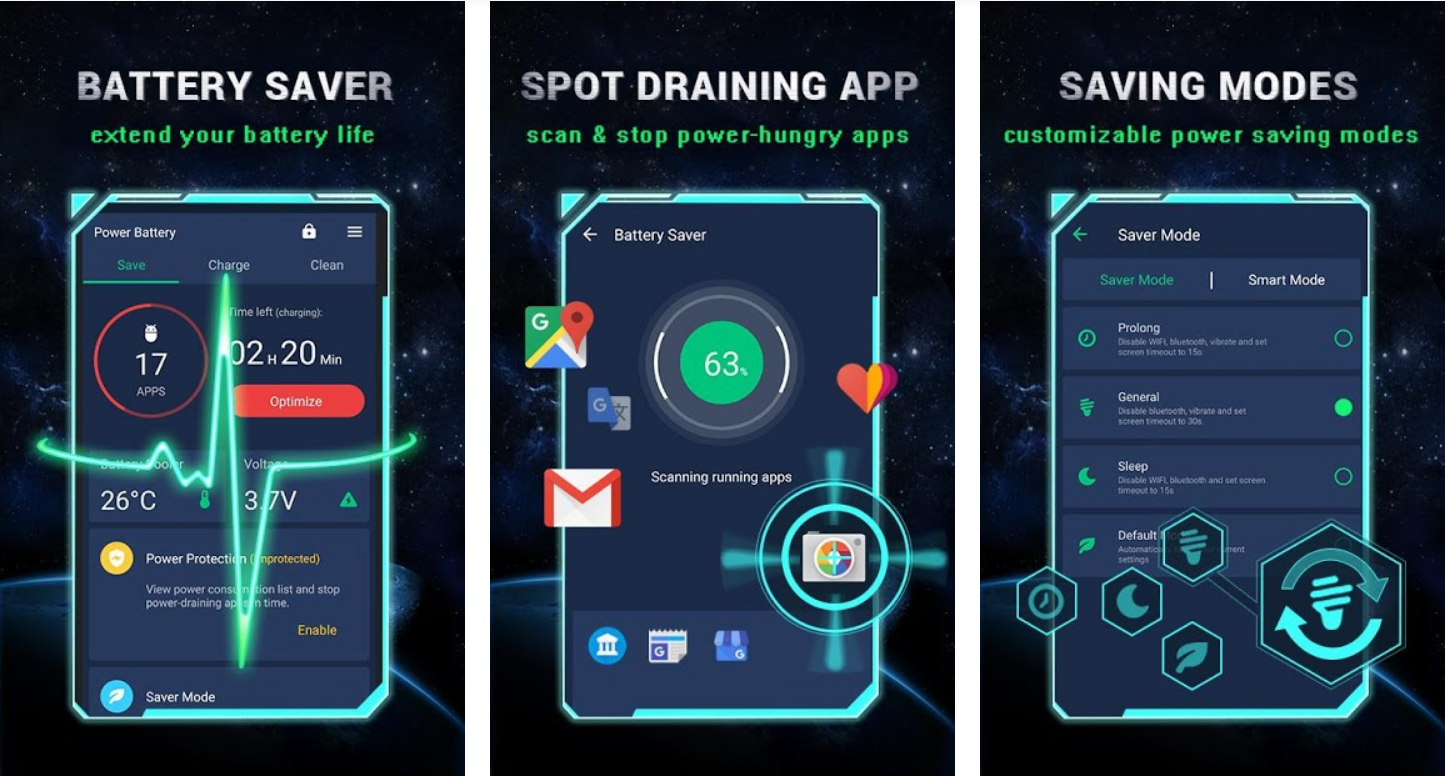
- Developed by LIONMOBI, Power Battery is definitely one of the best Android Battery Life Saver apps out there in the market.
- It detects the battery-draining apps automatically and fixes the problems.
- The one-click optimization feature of this app solves the battery problems of the device.
- Power Battery has a 2 mode of low battery reminder with which user can easily find out that their phone is running out of battery & need charging.
- Power Battery app for Android has 3 power saving modes, i.e., Speed Mode, Continuous Mode, and Trickle Mode. This feature controls the voltage input and improves battery life.
- The Battery Charge Monitor feature of the Power Battery provides detailed information about battery consumption.
- Apart from saving phone battery, this app has a couple of helpful features such as Junk cleaner & memory booster.
- The android user can generate a battery report, including power saving info, power consumption info, live battery status, battery history charge time, etc.
3. Naptime – Best Doze Mode Battery Saver 2026:
- Naptime Best Android Battery Saver App
- Naptime is one of the best battery saver apps that improves Android’s Doze Mode for maximum power saving.
- It is a free and lightweight tool that reduces background activity when the phone is idle.
- The app automatically limits wake-up triggers and unnecessary processes.
- Naptime forces apps to stay inactive when not required, preventing battery drain.
- This extreme battery saver boosts overall performance and extends screen-on time.
- It is light on system resources and works smoothly on most Android devices.
- It does not collect or store any personal user information.
4. Accu Battery – Smartphone Battery Saver App:

- Accu Battery is among the top battery saver Android.
- It quickly detects the battery stats with high accuracy in comparison to the device’s system.
- This battery-saver app measures the actual battery usage, sourcing information from the battery charge controller.
- Accu Battery also analyzes the battery power and provides battery usage information.
- With this Android battery saver app, the device charges fast.
- The best part about this battery-saver app is, it has an inbuilt Charge Alarm feature that sends notifications about the full charge.
- The user can see the wear of the battery that it sustains in each charge session.
- Accu battery boosts device performance and promises a healthy battery.
5. Battery Doctor (Power Saver) – Best Battery Optimizer for Android:

- Battery Doctor is a superpower-saver app designed for Android devices.
- Users can set up a low power threshold for the device.
- Battery Doctor also features easily disabling unnecessary apps or abnormally running apps in the background that drain battery power.
- Controlling the brightness of the app is easier with the app.
- The battery saver app provides information about battery temperature, voltage, and battery technology.
- With just one tap, users can optimize battery power and stop the over-consumption of battery power.
- This Android battery-saver app supports 28 languages and is designed with a user-friendly interface.
6. Battery HD- Smartphone Battery Monitor App:
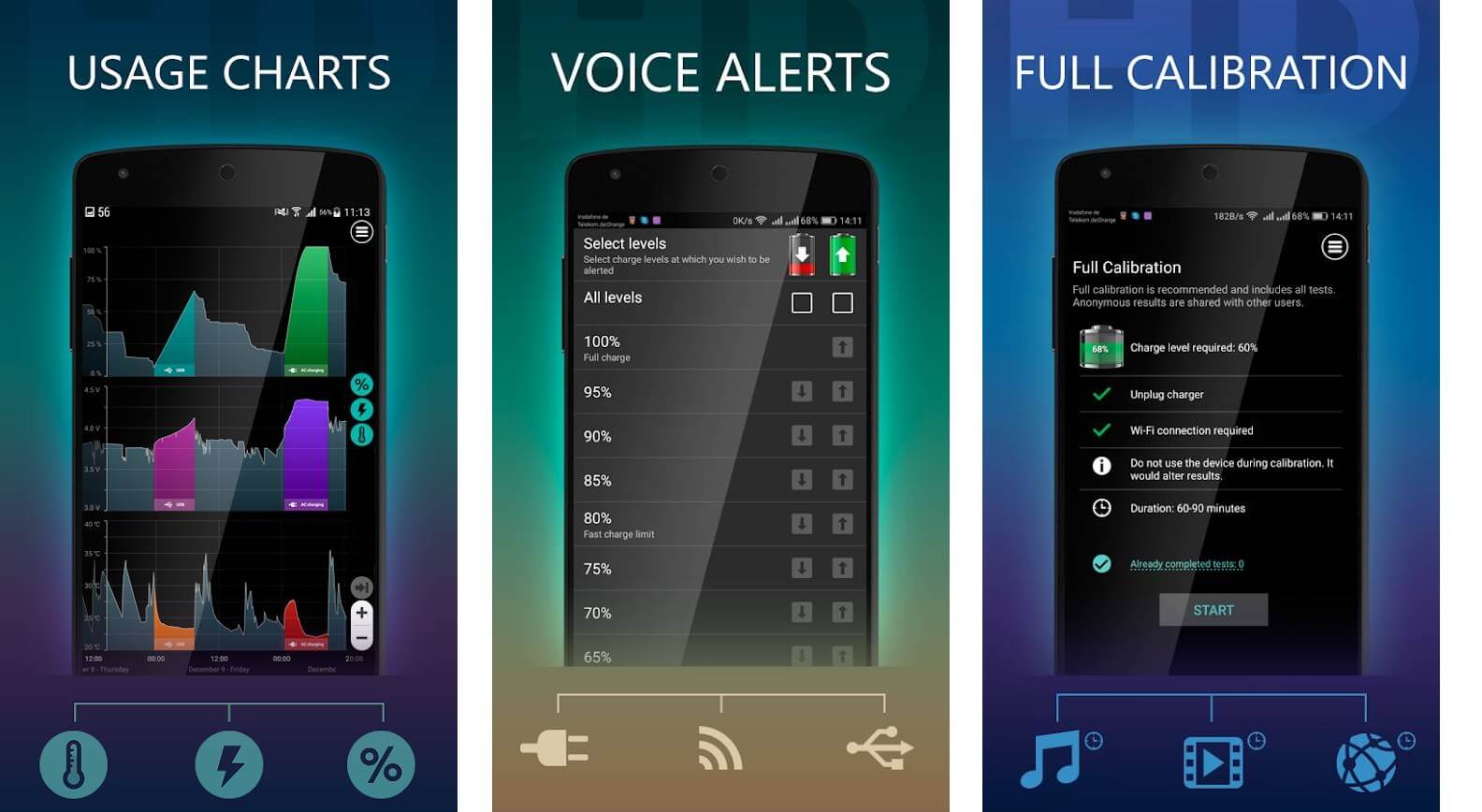
- Battery HD is the best battery monitor app for battery saver android.
- This battery monitor and saver app has an excellent user-interface design.
- Battery HD app lets to know the hours the battery will support for listening to music, watching videos, recording videos, clicking photos, talk time, internet browsing, LED Flashlight, 2D & 3D games, standby mode, etc.
- The app can get placed in the notification bar as well as inside a widget.
- With precise battery monitoring feature makes it act as a battery saver app for Android devices.
- The full battery calibration feature makes this app more unique.
7. Avast Battery Saver – Best Cell Phone Battery Saver App:

- Simply open the Avast battery saver android and press “Stop Apps” to instantly boost the performance of your Smartphone.
- Thanks to the application’s adaptive energy estimate feature, you’ll know exactly how much is battery life left in your phone.
- With the Avast battery-saver app, activate pre-allocated profiles to optimize your Smartphone’s settings to suit your requirement.
- Plan when you’ll have to connect your phone to a charger on the basis of your phone’s utilization.
- Capable and simple to utilize, Avast Battery Saver gives you complete control over your gadget.
- This battery saver app gives you 5 profiles to choose from: Emergency, Smart, Home, Work, and Night.
- Use Adaptive Smart Profile to let the application change your phone’s settings as per your standard utilization.
- Get notifications and alerts to change to an alternate profile on the basis of your activity and battery level.
- Easily switch from the various profiles and manage them inside the application itself.
8. Kaspersky Battery Life – Accurate Battery Drain Monitor

- Kaspersky Battery Life: Best Android Battery Saver App
- Kaspersky Battery Life is a powerful battery monitoring app designed to identify high-drain apps quickly.
- It is a free app that provides real-time alerts when an app consumes more battery than usual.
- The app helps users stop unnecessary background apps with one tap.
- Kaspersky Battery Life improves daily battery backup by controlling abnormal power usage.
- This battery saver app enhances device efficiency without slowing performance.
- It is lightweight and simple to use for beginners.
- The app does not access or misuse personal information.
9. Background Apps Stop – Best Background App Controller 2026
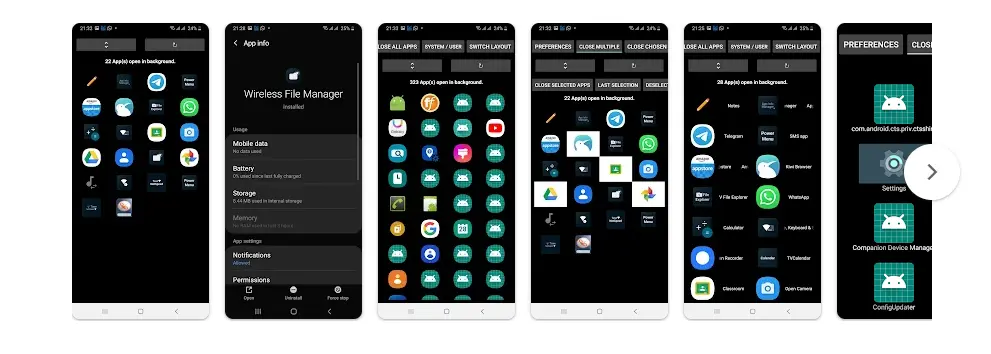
- Background Apps Stop: Best Android Battery Saver App
- Background Apps Stop is a useful battery saver app that helps you stop apps from running in the background.
- It is a free app that lets you view battery and RAM usage with simple controls.
- The app allows you to easily close background apps that consume power unnecessarily.
- Background Apps Stop improves battery life by reducing invisible processes and power drain.
- This extreme battery saver contributes to longer standby and screen-on time.
- It is lightweight and works smoothly on most Android devices.
- The app does not collect or store personal user information.
10. The Battery Guru – Best Battery Health & Optimisation App
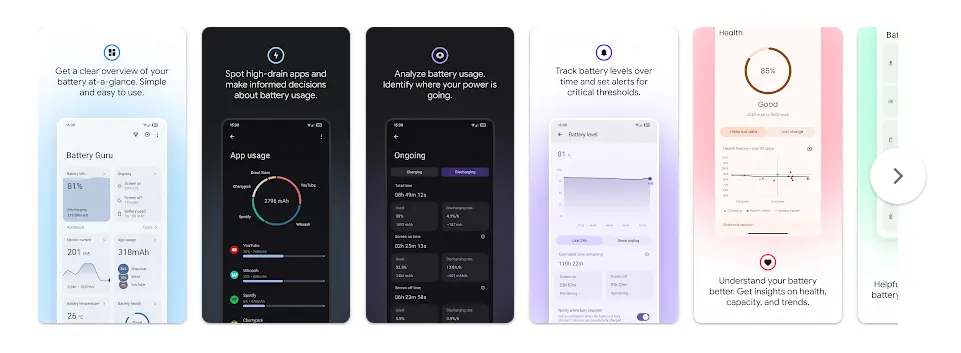
- Battery Guru: Best Android Battery Saver App
- Battery Guru is a useful app that focuses on both battery saving and long-term battery health improvement.
- It offers detailed insights into battery usage, charging patterns, and drain causes.
- The app provides smart alerts to prevent overcharging and overheating.
- Battery Guru optimises high-drain apps and enhances daily battery performance.
- This extreme battery saver helps prolong overall battery lifespan.
- It is lightweight, easy to use, and works efficiently on most Android phones.
- Battery Guru does not collect any personal or sensitive user data.
Battery Saving Tips Without Apps
You don’t always need an app to save battery. A few simple changes in how you use your phone can make a big difference:
- Lower your screen brightness or use auto-brightness.
- Reduce screen timeout to prevent your display from staying on when not needed.
- Turn off Wi-Fi, GPS, Bluetooth, and Hotspot when you’re not using them.
- Use Dark Mode, especially if your phone has an AMOLED display.
- Disable background data for apps that you don’t use often.
- Uninstall or disable battery-draining apps that run silently.
- Keep your phone cool, as heat reduces battery efficiency.
- Update your apps and OS, since updates often include battery optimisations.
Following these habits, along with a good battery saver app, can help you get the best possible battery backup from your smartphone.
What’s the Takeaway?
There are top applications for each and every one of your functions, like organizing your day, scheduling, To-Do, and many more. But when it comes to the battery, you have to be really choosy about the type of battery saver for the Android phone you use. The available list of battery manager apps described above is some of the top in the market. Now you can use any of these apps as per the device specifications and your requirements.
All these best Android battery-saving apps are most installed and updated. User ratings for all these apps are pretty high; you can check them for yourself when you go to the Google Play Store. Using any one of these apps, you can personally experience the effectiveness of the features and ensure the longevity of the battery power and life! Keep your Android devices protected, secure, clean, and fast-performing, along with enhanced battery life! Enjoy extended battery life by installing a smart battery power-saving app!
FAQs:
Here is the list of the best 7 battery saver apps for Android phones:
1) Greenify
2) Power Battery
3) Naptime
4) Accu Battery
5) Battery Doctor
6) Battery HD
7) Avast battery saver
8) Kaspersky
9) Background App Stop
10) Battery Guru
Yes, they do work. The battery-saving apps enable less battery power mode by as much as 50% and improve the battery life and help extend battery life by 20%. These apps run frequently in the background and search for battery consumption.
The effectiveness of battery-saving apps varies, but popular options include Greenify, AccuBattery, and Battery Doctor.
There isn’t a universally best app, but Greenify is highly regarded for addressing low battery problems by hibernating apps to prevent battery drain.
Yes, you can turn on battery saver at 100%. It will not harm your phone or battery. However, battery saver is mainly useful when your battery level is low. Turning it on at full charge may limit some background activities and performance even when you don’t need to save power.
Charging up to 80% is generally better for long-term battery health. Lithium-ion batteries last longer when they avoid full 100% charge cycles. However, charging to 100% occasionally is safe and sometimes necessary when you need maximum backup. For daily use, keeping your charge between 20% and 80% is ideal.