

If you’ve been in digital marketing for more than five minutes, you already know one thing: SEO never sits still. One month, Google rolls out a “helpful content update,” the next month it tweaks something else that sends everyone racing to understand what changed.
And honestly, who has the time to track all that manually? That’s exactly where SEO tools come in-they catch things you’d miss, crunch boring data, and help you make smarter decisions without losing your mind.
These tools are the quiet heroes behind keyword research, backlink analysis, core web vitals checks, SERP tracking, and even content creation. And with 2025 shaping up to be a pretty wild year-AI-driven search results, SGE, stronger EEAT signals-having the right tools in your pocket isn’t just helpful, it’s almost mandatory.
So this guide brings you the Top 15 Best SEO Tools of 2025, covering both free and paid options, along with expert suggestions on how to choose the right ones, how to combine them, and how to actually use them to boost rankings.
How to Choose the Right SEO Tool (Without Overthinking It)
You know what? Lots of people buy SEO tools and then barely use them because they picked the wrong ones. Let’s keep it simple.
Think of SEO tools like different gadgets in a toolbox—each one does a specific job:
- Keyword research tools → For finding what people search for – Ahrefs, SEMrush, Ubersuggest
- Competitor analysis tools → For spying on other websites – SpyFu, SEMru
- sh, Ahrefs
- Technical SEO tools → For scanning site issues – Screaming Frog, PageSpeed Insights
- On-page optimization plugins → For WordPress SEO help – RankMath, Yoast
- Reporting dashboards → For data visualization – Google Data Studio, GA4
A good rule of thumb?
If you’re a beginner: start with Google Search Console, GA4, PageSpeed Insights, and a free SEO tester like Ubersuggest.
If you’re a growing business or agency: invest in SEMrush or Ahrefs—they’re basically the Swiss Army knives of SEO.
Choosing based on problems you want to solve will save you money and stress.
Best SEO Tool Combinations for Maximum Results
Here’s the thing: no single tool does everything. But smart combinations? They can seriously turn your SEO workflow into something incredibly efficient.
SEMrush + Screaming Frog
Great for technical SEO + keyword gap analysis.
SEMrush shows the big picture; Screaming Frog digs into the messy details.
Ahrefs + Google Data Studio
Perfect for backlink reporting.
Export Ahrefs link data → build live reports in Data Studio → wow your clients.
RankMath + Google Search Console
Solid on-page optimization + indexing insights.
RankMath lays the groundwork, GSC shows what’s actually working.
Ubersuggest + Ans werThePublic
Killer combo for long-tail keywords and content ideas.
Perfect for blogs, YouTube creators, and small startups.
These combinations aren’t just convenient—they maximize ROI because each tool fills the other’s gaps.
List of Top 15 Best SEO Tools in 2025 (Free & Paid)
Please note that there are 100s of free and paid tools available in the market, and this is not the final list for sure. We will keep updating this article with new tools over time. Our list will start with one of the best SEO marketing tools in the industry.
1. SEMrush:

SEMrush is one of the best tools out there for Digital Marketers. The database of SEMrush consists of more than 46 million domains and more than 120 million keywords. SEMrush offers great functionality in terms of marketing. SEMrush makes your keyword research more productive and effective. It provides various variations of a specific keyword so that you can know what is searched on the internet. You can also check the density of the keyword searched online that is how many times a specific word has been searched along with the average price of a click. This eventually helps you with the optimization of a keyword.
Apart from this, you can also keep track of your competition. You can know how well they are doing how much traffic they are getting and which keywords are ranking higher. This will be useful in preparing your strategy for outranking your competitors. SEMrush manages to keep a record of your past and current rankings, so you can easily analyze your growth. It also consists of tremendous link-building features.
Pricing of SEMrush:
You get a free 7-day trial of a pro or guru plan. Later, there are charges depending upon the plan. The price of the pro plan is $129.95 per month whereas, the guru plan costs $249.95 per month. Apart from these two, there is a business plan that costs around $499.95 per month.
Best for: keyword clusters, competitor analysis
Features: keyword research, SEMrush backlink checker, audits, topic research
Why we like it: It’s the most complete SEO tool for serious marketers
2. Moz – All in One Tool:

Moz bar a complete SEO tool that has features like a Ranking tracker, Crawling and auditing your site, Link Explorer, Customized reports, and many others. The ranking Tracker feature allows you to know your as well as your competitor’s rank based on the keywords. With the help of crawling and auditing, you can know the issues on your site so that you can easily fix them. Link Exploring enables you to know all the detailed information regarding any site like domain authority, linking domains, inbound links, etc. The customized feature is another amazing feature that creates on-page optimization reports, and ranking data reports and you can also export this data to PDF.
It also has important features like Domain authority (DA) and Page Authority (PA). Domain authority tells you how good is the possibility of your website ranking on a search engine result page (SERP). The score of domain authority ranges from 1 to 100, with being the minimum possibility and 100 being the maximum chance to rank. The calculation of domain score is based on their link metrics that include the number of total links, linking root domains, Moz rank, etc.
Page Authority is the same as domain authority but here you can know how good a page will rank rather than the whole website on a search engine. The score varies from 1 to 100, the same as domain authority. It is calculated keeping in mind the Domain authority score and a machine learning model to know the algorithm that correlates with various pages across the search engine.
Pricing of Moz Pro:
A free trial is available for 30 days. After that, there are 4 plans from which you can choose. Every plan includes varied sets of features and you see those features in the official link given below.
- Lite: $99-per month
- Standard: $199-per month
- Advanced: $399-per month
- Enterprise: $999-per month
Best for: domain authority metrics
Features: Moz Chrome plugin, link explorer, site crawl
Why we like it: Great for DA/PA tracking and beginners
3. Ahrefs – Tool for backlink and SEO analysis:

Ahrefs tool is an (amazing) majorly famous for its backlink analysis and exploring keywords. In the beginning, Ahrefs only did backlink analysis but over time it has grown and has included many features like site auditing, keyword research, SEO reporting, etc.
We will be talking about the most (important) features of Ahrefs, that is keyword analysis and Backlink analysis. So, we all know keyword analysis is an important aspect of SEO. The reason behind it being the most preferred keyword analysis tool is that it contains a database of more than 7 billion keywords which is also updated at the start of every month. Data is not restricted to a specific place and you get the keywords for around 171 countries.
Ahrefs keyword explorer tool gives us a keyword difficulty score along with the estimated number of clicks for specific keywords. You have to just add some keywords and it will provide you with an accurate volume of keywords and also a lot of suggestions with the help of which you can create some ideas for your specific blog title. It not only gives you the keyword information of Google but also from nine other search engines like YouTube, Amazon, Bing, Yahoo, etc. This helps you in getting the exact information from all the reliable sources. It also provides you the information regarding the paid keywords that your competitors are using.
Backlink analysis is the most trusted feature of Ahrefs. You can get a list of all your backlinks and also your competitors. It is considered the fastest backlink crawler and is said to have the world’s biggest live index of backlinks. You can easily keep an eye on all the backlink profiles. It provides other information like the total number of backlinks and referring domains, Domain and URL rating, and Ahrefs rank. It also gives you the estimated organic traffic to every linking page. You get a detailed report of all the outbound links and also the list of broken links. These are some features of the Ahrefs tool. For more information, you can check out the official website.
Ahrefs Pricing:
There is a 7-day trial period that you can access by paying $7, which will provide access to all its features. After that, there are four plans from which you can choose as per your usage and functionality.
- Lite – $99 per month
- Standard – $179 per month
- Advanced – $399 per month
- Agency – $999 per month
Best for: backlink analysis
Features: Ahrefs free keyword research tool (limited), site explorer
Why we like it: The fastest backlink index in the industry
4. Screaming Frog – Crawler software & spider tool:
Screaming Frog is one of the best SEO tools for digital marketing. This SEO Spider is a versatile website crawler essential for onsite SEO improvement. It efficiently audits websites and allows real-time analysis. This tool is crucial for SEO professionals to make data-driven decisions. Its features include checking for broken links, analyzing page titles and meta data, and auditing hreflang attributes. It also finds duplicate pages, generates XML sitemaps, and provides site visualizations. Additionally, it offers advanced options like JavaScript rendering, crawl comparison, and AMP validation. Integration with Google Analytics, Search Console, and PageSpeed Insights makes it a comprehensive tool. The best thing is you get free technical support.
Pricing of Screaming Frog:
There are mainly two versions, free and paid. The free version has limited features and allows us to crawl only 500 URLs. Whereas, there is no restriction in the paid version and you can crawl as many links as you want. It also has added features like JavaScript rendering, Amp crawling and validation, free technical support, etc.
Best for: technical SEO audits
Features: crawl analysis, broken link detection, JS rendering
Why we like it: Extremely detailed and accurate
5. Google Search Console:

It is a set of tools that enables you to know how Google views your website. You can check all the detailed statistics of your website including the internal and external links. It also tells you the keyword that was searched by the user that took him to your website. Google Search Console (GSC) includes many features such as Keywords, sitemaps, links, etc.
In the keywords section, you can see the keywords that are used by users and also the keywords that google notices on your website.
The sitemap field enables you to see the sitemap of the website and if you see any new or old pages have been missing in that one then you can easily submit a new sitemap of your website.
Links are one of the important parts of Google Search Console as it provides you with all the details regarding the internal and external links that have been connected to your website.
Google Search Console tool enhances your site and eventually helps you to make it better for the users.
Pricing:
This is a free service that can reduce your efforts in providing a seamless experience to the users.
Best for: performance tracking
Features: indexing, keyword performance, mobile issues
Why we like it: Free, essential, incredibly reliable
6. Google Analytics 4:

It brings all the information to you related to your users. Google Analytics 4 tells you the daily number of visitors on your site or also on your specific page. It lets you know the location of the visitors which means you can check from which place you are getting the most number of visitors. This will ultimately help you to know about your customers or users in a much better way and that can help in developing your website more effectively and efficiently.
Campaigns are an important part of a business to gain more and more customers. So, with the help of Google Analytics, you can easily create campaigns and keep track of them for effective business.
You can also check the percentage of the users that are bouncing off from your website and if the rate is higher, then you can see the issue and fix it to make the users stay on your website.
It also tells you from which source you are getting traffic like organic search, referrals, social media, or any other. Further, in organic search, you can check the amount of traffic from Google, Bing, Yahoo, or other search engines on ga4 data.
Hence, GA4 is a perfect tool to keep track of your website, the number of users, and effective campaign management.
Pricing of Google Analytics:
Google Analytics 4 has two plans to offer. First is a free version, in which you can get all the necessary features. However, if there is a large enterprise then they can buy Google Analytics 360, which is available at $12,500 per month. Although the ga4 360 cost is very high it also provides you with a lot of features that justify the price tag.
Best for: user behavior insights
Features: traffic, engagement, demographics
Why we like it: Crucial for understanding your visitors
7. Google PageSpeed Insights – Web Performance Tool

Page speed insights analyze the performance of your website on mobile and desktop. It also mentions the issue and the ways you can improve the speed of your page or website. The rating of your website is on a scale of 1 to 100 based on its performance. You can measure the speed from the score below,
- 0 to 49 – slow
- 50 to 89 – average
- 90 to 100 – fast
Pricing:
At the moment, it is available free of cost without any charges.
Best for: site speed checks
Features: CWV scores, speed suggestions
Why we like it: Helps fix real performance issues
8. Spyfu – Competitors Tracker Tool
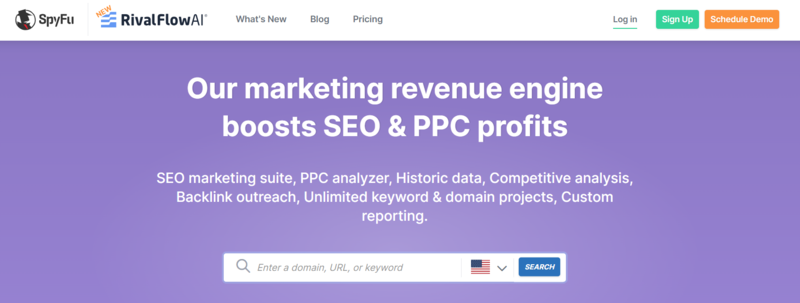
Spyfu helps you to keep track of your competitors. All you need to do is enter the website and it will provide you with the list of all the keywords that they rank for or they have bought on Google Adwords and also its variations. You can know the specific things that made the campaign of your competitors successful. In brief, if your competitor is doing well then with the help of this tool you can know what worked for them. After getting the information, you can study your website and work in that direction to generate more traffic.
SpyFu Pricing:
Spyfu offers the basic premium plan free for 2 months. Two plans in general are mentioned below along with the price,
- Basic – $39 per month
- Professional – $79 per month
Best for: competitor PPC spying
Features: paid keywords, history graphs
Why we like it: Shows what’s working for your rivals
9. Ubersuggest – SEO Tool for Keyword Ideas

If you are looking for a free SEO optimization checker, Ubersuggest is one of the best options. This is a free Chrome extension and comprehensive SEO tool. It provides key data like search volume, CPC, and competition for keywords. It offers insights on Google, YouTube, Amazon and more. Easy to use, this popular SEO tool displays data directly in search results. It offers detailed keyword and SEO insights with a simple click. Some of its unique features include trend graphs, showing monthly search volumes, traffic estimations under Google search URLs, and backlink data to enhance link-building strategies. Users can customize location and language settings, and access additional metrics like related keywords, trending searches, and long-tail keywords. Ubersuggest also provides valuable domain metrics, historical traffic data, and popular pages and keywords by country. Available in nine languages, Ubersuggest helps users refine their SEO strategies effectively.
Pricing of Ubersuggest:
- Business: $20-per month
- Individual: $12-per month
- Enterprise: $40-per month
Best for: affordable keyword research
Features: long-tail ideas, Ubersuggest backlink checker
Why we like it: Great balance of price + simplicity
10. Google Data Studio:

Data visualization is the key for any business and when you can visualize your Google Analytics data with simple integration, it will ease your job for sure. Google Data Studio does this job for you without paying a single penny. Google Data Studio is a reporting solution and one of the best free tools for users who want to go beyond data visualization.
The tool helps you to transform the data and make it more appealing for presentation. Google Data Studio allows connecting data sources including Google Analytics, Search Console, Google ads, YouTube, and many more. With Google Data Studio you can connect your data, create impactful reports, collaborate with teammates, and design compelling reports to share with different stakeholders.
Pricing
It is available free of cost without any charges.
Best for: reporting dashboards
Features: analytics integration, live dashboards
Why we like it: Makes reports client-ready
11. RankMath:
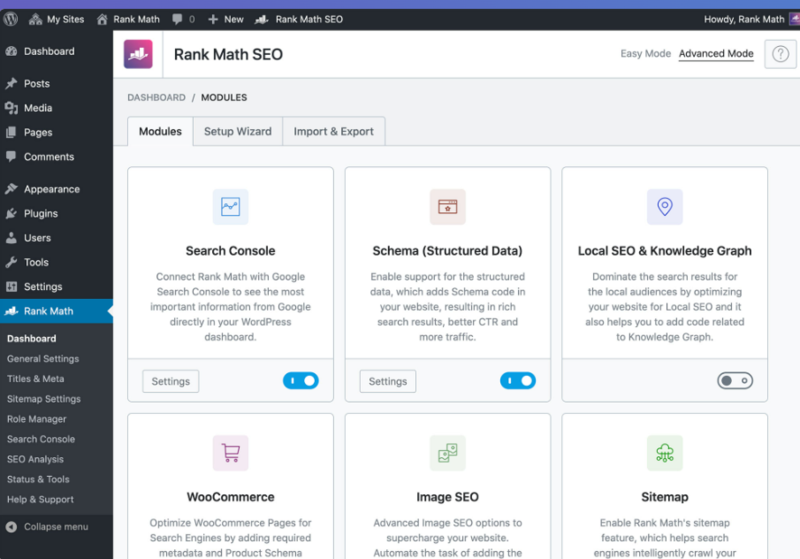
Rank Math is a user-friendly SEO plugin for WordPress. It is designed to optimize content with easy-to-follow suggestions. This plugin aligns with the best SEO practices. It allows users to customize key settings, control page indexation, and enhance search appearance with Structured data. It boasts over 15 configurable modules tailored to specific needs. RankMath enables users to track keyword rankings and conduct comprehensive SEO analyses based on 30 factors. It also offers hassle-free imports from other SEO plugins and compatibility with WordPress Gutenberg and Classic Editors. Additionally, it supports over 20 Schema types, including FAQ and How-To, to help win rich snippets.
Pricing:
RankMath is completely free to use. For business purposes or for the one who wants to rank higher on Google, there is a Rank Math Pro plan that starts at $6.99 per month.
- Agency price: $49.99
- Business Price: $20.99
Best for: WordPress SEO
Features: schema, on-page checks
Why we like it: More advanced options than Yoast
12. Yoast SEO:

Yoast is a leading WordPress plugin designed to boost your website’s SEO. It’s the go-to tool for enhancing your site’s visibility and driving organic traffic. The free version of Yoast SEO lays the foundation for solid SEO practices. The Yoast SEO premium version starts at $99 per year along with its extensions, and offers additional advanced tools for further SEO enhancement. Yoast’s core mission is to make SEO accessible to everyone, regardless of their skill level. It provides essential tools for beginners and experts alike, simplifying complex SEO tasks. The plugin’s newest feature, the AI title & meta description generator, makes creating optimized and engaging SEO titles and descriptions easier and more effective than ever.
Pricing
It is available free of cost without any charges.
Best for: on-page beginner optimization
Features: readability, meta templates
Why we like it: Great for blogs
13. SERPWatcher:

SERPWatcher is a modern rank-tracking tool designed to simplify and enhance how you track website rankings. The tool’s key feature is the Performance Index, which combines keyword positions and search volumes to gauge your website’s organic traffic potential. With SERPWatcher, you can monitor daily website rankings and view them in SERP previews. It also sends email alerts for significant rank changes. The tool offers precise local data for over 50,000 locations, including detailed areas like states, counties, and cities. It supports both desktop and mobile search results. Additionally, SERPWatcher facilitates collaboration and client engagement with its interactive report-sharing feature. Regularly scheduled reports and event-based alerts ensure you’re always informed about critical ranking changes.
Pricing
- Basic : $14-per month
- Premium: $22-per month
- Agency: $44-per month
Best for: rank tracking
Features: performance index, daily updates
Why we like it: Very intuitive for beginners
14. Jasper:

Jasper is an innovative AI marketing assistant. It offers numerous SEO advantages. It enhances keyword optimization by seamlessly integrating target keywords into content in a contextually relevant manner. Jasper’s AI-driven approach streamlines project management and team coordination in marketing, accelerating campaign execution. It also automates feedback collection and content revision. This tool excels in creating SEO-friendly content quickly, ranging from blog posts to social media updates. Jasper assists in crafting effective meta descriptions and title tags. Thus, it is essential for boosting click-through rates. Its generated content is reader-friendly. The tool caters to SEO preferences for content that enhances user experience. Furthermore, Jasper includes analytics features to monitor content performance. It offers data-driven suggestions for improvements and insights into content trends. This holistic approach benefits high-volume marketing teams by providing a clear view of ROI and the future.
Pricing
- Creator: $49-per month
- Pro: $69-per month
Best for: AI-powered content creation
Features: templates, SEO-friendly writing
Why we like it: Helps create faster, cleaner content
15. NordVPN:
NordVPN is a highly secure VPN service that utilizes advanced technology to protect your online activity. It’s so secure that even the most powerful computer would need billions of years to decrypt your data. NordVPN focuses on providing fast connection speeds. It ensures a smooth internet experience whether you’re sending emails, playing games, or streaming videos. It offers unlimited data, and access to thousands of servers worldwide, and uses modern VPN protocols for efficient performance. For enhanced privacy, its Double VPN feature encrypts data and changes your IP address twice. You can connect up to six devices simultaneously. Therefore, you get secure and private internet access across multiple devices, even on public Wi-Fi networks.
Pricing of Nord VPN:
- Standard: $12.99-per month
- Plus: $13.99-per month
- Complete: $14.99-per month
Best for: secure, clean SERP checking
Features: IP masking, location switching
Why we like it: Useful for checking SERPs from any region
Also Read: Best Free & Paid VPNs for Android in 2023
Which Tools Are Best for Beginners, Agencies & Enterprises?
Beginners
- Google Search Console
- PageSpeed Insights
- Ubersuggest
- RankMath
Growing Businesses
- SEMrush
- Ahrefs (Standard Plan)
- Screaming Frog (Paid)
Agencies & Enterprises
- Ahrefs Advanced or Agency
- SEMrush Guru or Business
- SERPWatcher
- GA4 360
Different stages need different tools—there’s no one-size-fits-all.
2025 SEO Trends & How These Tools Support Them
2025 isn’t the same old SEO game. A few things are dominating:
1. AI-Generated SERPs (SGE)
Google’s Search Generative Experience prefers content with clarity, accuracy, and authority. Tools like Ahrefs, SEMrush, and Jasper help refine content structure and insert truly useful details.
2. EEAT: Experience, Expertise, Authority, Trust
On-page SEO plugins like RankMath and Yoast help generate schema data to boost EEAT signals. Structured data = better SERP visibility.
3. Core Web Vitals
Page load speed and user experience matter more than ever.
Tools like PageSpeed Insights and Screaming Frog flag performance issues before they hurt rankings.
4. AI-Assisted Content Optimization
Tools like Jasper and SurferSEO help craft content faster while keeping it SEO-friendly—just remember AI is a tool, not a replacement for human insight.
Good tools don’t just support these trends—they make adapting to them simpler.
Final Thoughts:
Leveraging the right SEO tools is essential for enhancing online presence and security in today’s digital landscape. Whether it’s optimizing website content for search engines, tracking keyword rankings, generating high-quality content, or ensuring online privacy and security, the best SEO tools are invaluable. They offer a range of functionalities from SEO optimization, content creation, and data analysis, to robust online protection. Start using these tools from today. You will notice significant improvements in digital marketing efforts, content quality, and online safety, ultimately contributing to greater online success and security.
FAQs
The best SEO tools for 2025 include SEMrush, Ahrefs, Moz Pro, Screaming Frog, Google Search Console, GA4, PageSpeed Insights, Ubersuggest, SpyFu, RankMath, Yoast, SERPWatcher, Jasper, Google Data Studio, and NordVPN. These tools help with keyword research, competitor analysis, audits, backlinks, and content optimization.
Beginners can rely on free SEO tools like Google Search Console, Google Analytics 4, Google PageSpeed Insights, Ubersuggest (free version), and RankMath. These tools provide essential insights without requiring a paid subscription.
Yes, free SEO tools provide reliable data for basic SEO tasks. Tools like Search Console, GA4, and PageSpeed Insights come directly from Google, making their data trustworthy. However, paid tools offer deeper insights and more comprehensive analysis.
Free SEO tools cover essential tasks like indexing checks, keyword tracking, and performance monitoring. Paid tools offer advanced features such as competitor analysis, keyword difficulty scoring, backlink profiles, SERP tracking, content clustering, and audit automation.
SEMrush and SpyFu are the top tools for competitor research in 2025. SEMrush provides keyword gap analysis, traffic comparison, and backlink insights, while SpyFu shows your competitors’ paid keywords and ad history.
For technical SEO, Screaming Frog is the most powerful crawler, followed by Google PageSpeed Insights, Search Console, and Ahrefs Site Audit. These tools flag broken links, speed issues, redirects, and indexing errors.
RankMath and Yoast SEO are the best on-page optimization plugins for WordPress. They help with schema, meta descriptions, content readability, keyword placement, and page structure improvements.
SERPWatcher and SEMrush Rank Tracker are the best tools for daily ranking updates. They show keyword movements, performance scores, and location-based search visibility.