

Social media management tools are essential because managing social media in 2025 feels a bit like juggling flaming torches on a moving treadmill — and somehow you’re still expected to smile for the crowd. New platforms pop up, old algorithms change their mood every other Tuesday, and content formats… well, they multiply faster than anyone can keep up with. Short-form video, carousels, stories, livestreams, AI-generated clips — it’s a lot, even for seasoned social media pros.
And if you’re a social media manager, business owner, agency, or creator, you’ve probably felt that quiet panic when you realize you’ve spent half your day scheduling posts manually across five different apps.
Or maybe you’ve tried stitching together analytics from Instagram, LinkedIn, YouTube, and TikTok, only to end up staring at a spreadsheet that looks like it belongs in a sci-fi movie. You know what? You’re not alone. Nearly everyone managing social media today is fighting the same battle.
That’s exactly why social media management tools have gone from “nice to have” to “if you’re not using one, you’re burning hours.” The right tool can easily save 10 to 20 hours a week, depending on your workflow.
AI-driven scheduling helps you stay consistent, automations take care of repetitive tasks, and detailed analytics show you what’s actually working instead of leaving you guessing.
But here’s the thing: not every tool works for every type of user. A small business doesn’t need the same features as a large agency. A creator doesn’t need the same workflow as a remote team.
So instead of tossing you a generic list, we’re comparing the 20 best social media management tools in 2025 based on real needs, real workflows, and real pain points.
Let’s start by helping you figure out how to choose the right tool for you — without wasting time or money.
How to Choose the Right Social Media Management Tool

Choosing the right social media management software isn’t as simple as picking the tool with the most features. Honestly, that’s where a lot of people get stuck — they look at long feature lists, get overwhelmed, and then pick something that doesn’t really fit their workflow. The truth? Your tool should feel like an extra pair of hands, not another complicated dashboard you dread opening.
So let me walk you through the most important things to look for, based on the way real teams work today.
1. Scheduling & Bulk Automation
If you’re spending more time posting than planning, that’s a sign you need strong automation. Look for:
- Bulk scheduling tools (especially if you post daily or manage multiple brands).
- The ability to recycle evergreen posts.
- Visual social media content calendar views.
Small businesses and agencies benefit the most here — time saved is money saved.
2. AI Content Creation & Assistance
AI isn’t a magic wand, but it’s close. Tools now help you:
- Write captions
- Suggest hashtags
- Repurpose long content into bite-sized posts
- Predict ideal posting times
Creators and solo marketers will love this because it removes that “blank page” anxiety.
3. Social Inbox & Community Management
If you’re active on multiple platforms, replying to comments and DMs can turn into a never-ending chore.
A good unified inbox helps you:
- Answer messages from all platforms in one place
- Track important conversations
- Never miss a customer inquiry
Brands with high engagement (restaurants, local businesses, service providers) benefit a ton from this.
4. Approval Workflows & Team Collaboration
This matters more than people admit. You might not need it today, but once you bring in a designer, copywriter, or client, you’ll want:
- Commenting inside the calendar
- Draft approvals
- Version management
Agencies and larger teams should treat this as non-negotiable.
5. Analytics & Reporting
Let’s be real — guessing doesn’t grow brands. The tool should help you see:
- Which posts perform best
- When your audience is most active
- What formats work for each platform
- ROI across campaigns
If you report to clients or management, look for branded or white-label reports.
6. Platform Integrations
Make sure your tool connects with the platforms you actually use:
TikTok, YouTube, LinkedIn, Pinterest, Facebook, Instagram, Google Business Profile — and ideally more.
E-commerce brands might also want integrations with Shopify, WooCommerce, or product catalogs.
7. Mobile App & Chrome Extension Support
Sounds small, but trust me — it’s not.
A good mobile app lets you:
- Approve posts on the go
- Check analytics quickly
- Reply to comments
A browser extension makes link sharing way easier.
8. Price & Scalability
You want a tool you can grow with. Ask yourself:
- Will this become expensive as my business expands?
- Does pricing increase per user or per profile?
- Are key features locked behind premium plans?
Sometimes the “cheap” tool becomes the most expensive one later.
Comparison Snapshot: According to Your Size
| User Type | Must-Have Features |
|---|---|
| Small Business | Affordable pricing, scheduling, basic analytics, AI assistance |
| Agency | Affordable pricing, scheduling, basic analytics, and AI assistance |
| Solopreneur/Creator | AI captions, mobile app, simple calendar, auto-publishing |
| Remote Teams | Collaboration, shared calendars, multi-user access |
| E-commerce Brand | Scheduling, analytics, TikTok + Instagram support, fast community replies |
Now that you know what to look for, let’s walk through the 10 best social media management tools in 2025 — each chosen for a different purpose, so you can pick the one that truly fits your workflow.
20 Best Social Media Management Tools in 2025
1. SocialPilot — Best for Small Business Social Media Management
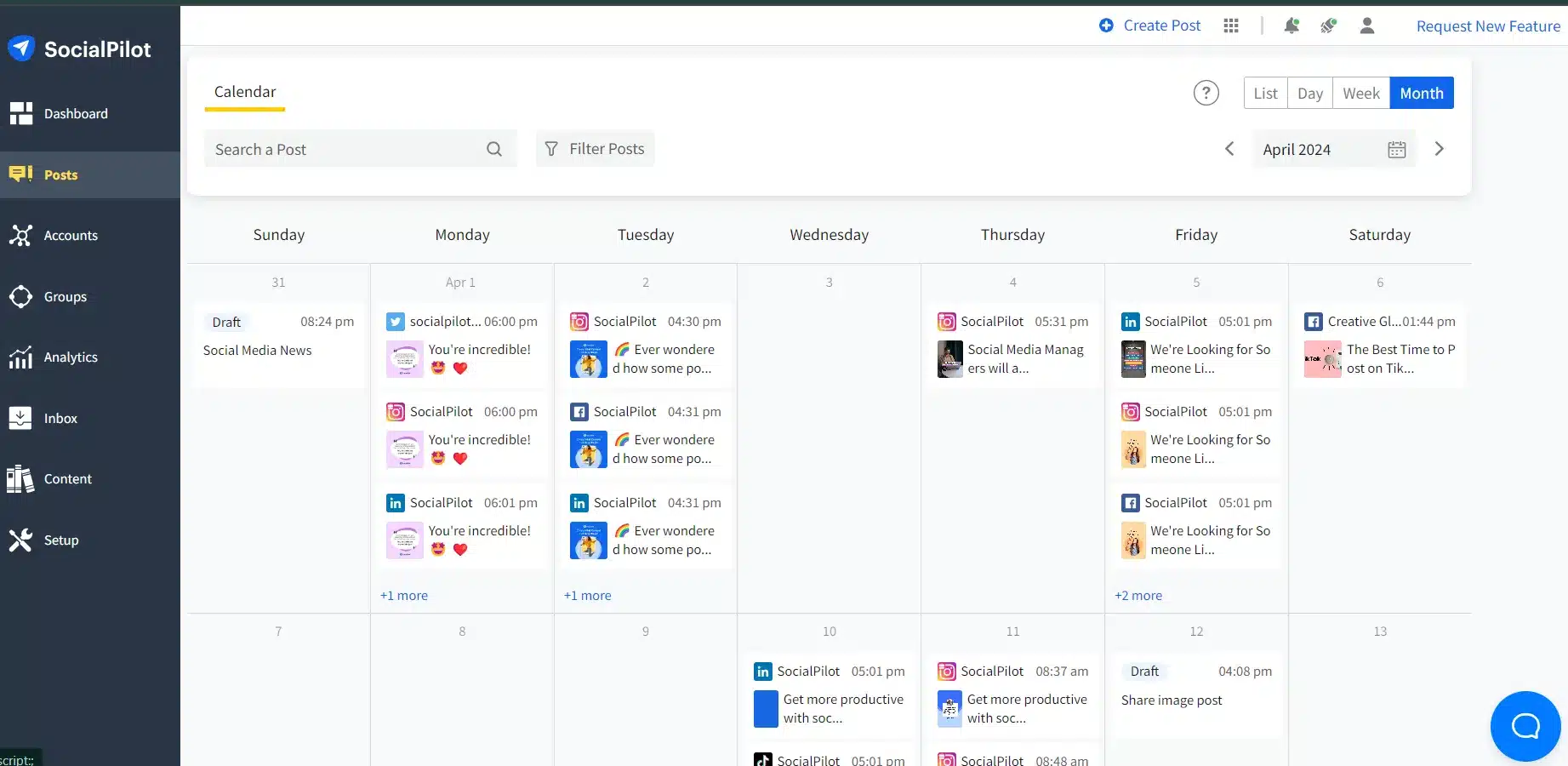
If you’re a small business owner juggling way too many tasks, SocialPilot feels like that reliable assistant who somehow always keeps things in order. It’s affordable, surprisingly powerful, and manages multiple platforms without making you feel overwhelmed. One of its biggest strengths is bulk scheduling — ideal for businesses posting regularly across Facebook, Instagram, LinkedIn, Pinterest, and Google Business Profile.
Why it stands out: SocialPilot gives small teams agency-level features without the agency-level pricing. You know what? That alone puts it ahead of many competitors.
Key Features:
- Bulk scheduling and visual social media content calendar
- AI caption assistance
- Client management dashboard
- White-label reporting
- Canva integration + URL shortening
Pros: Easy to use, budget-friendly, great support
Cons: The Interface feels a bit older compared to modern tools
Ideal for: Small businesses, freelancers, local brands
Pricing: Starts around affordable monthly plans for individuals and teams
2. Zoho Social — Best for Remote Teams
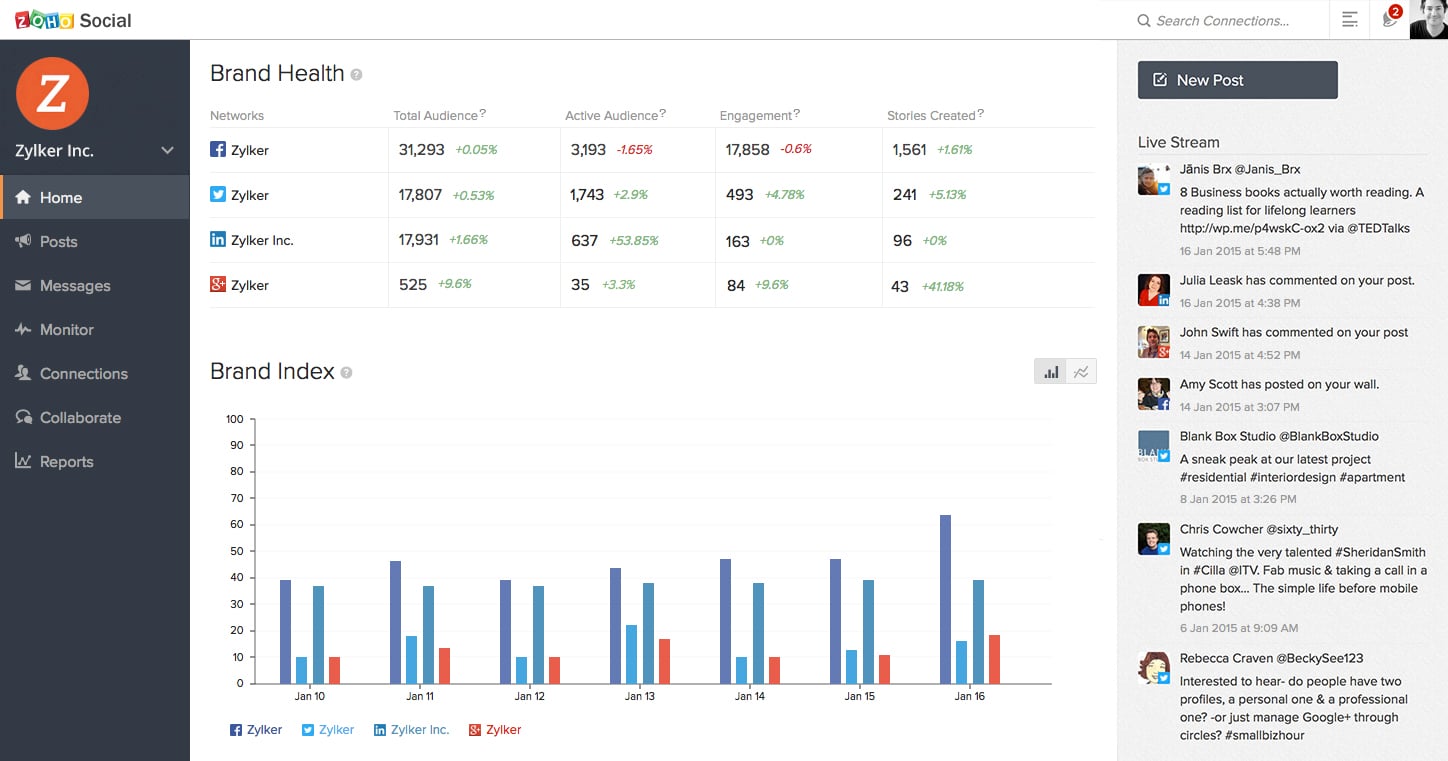
Zoho Social is built for teams that live in Slack, Notion, Zoom… and different time zones. Collaboration is its superpower. You can assign roles, leave comments, discuss drafts in real time, and manage client approvals without sending a single email.
Why it stands out: Seamless collaboration + integrations with other Zoho products make it perfect for remote marketing teams.
Key Features:
- Team collaboration tools with approvals
- Unified social inbox
- Advanced scheduling
- Integrates with Zoho CRM
- Detailed analytics dashboards
Pros: Great for teams, smooth workflow, CRM integration
Cons: UI can feel “corporate” rather than fun
Ideal for: Remote teams, agencies, SaaS brands
Pricing: Free plan available; premium plans still reasonably priced
3. Loomly — Best for Audience Targeting + Automated Workflows
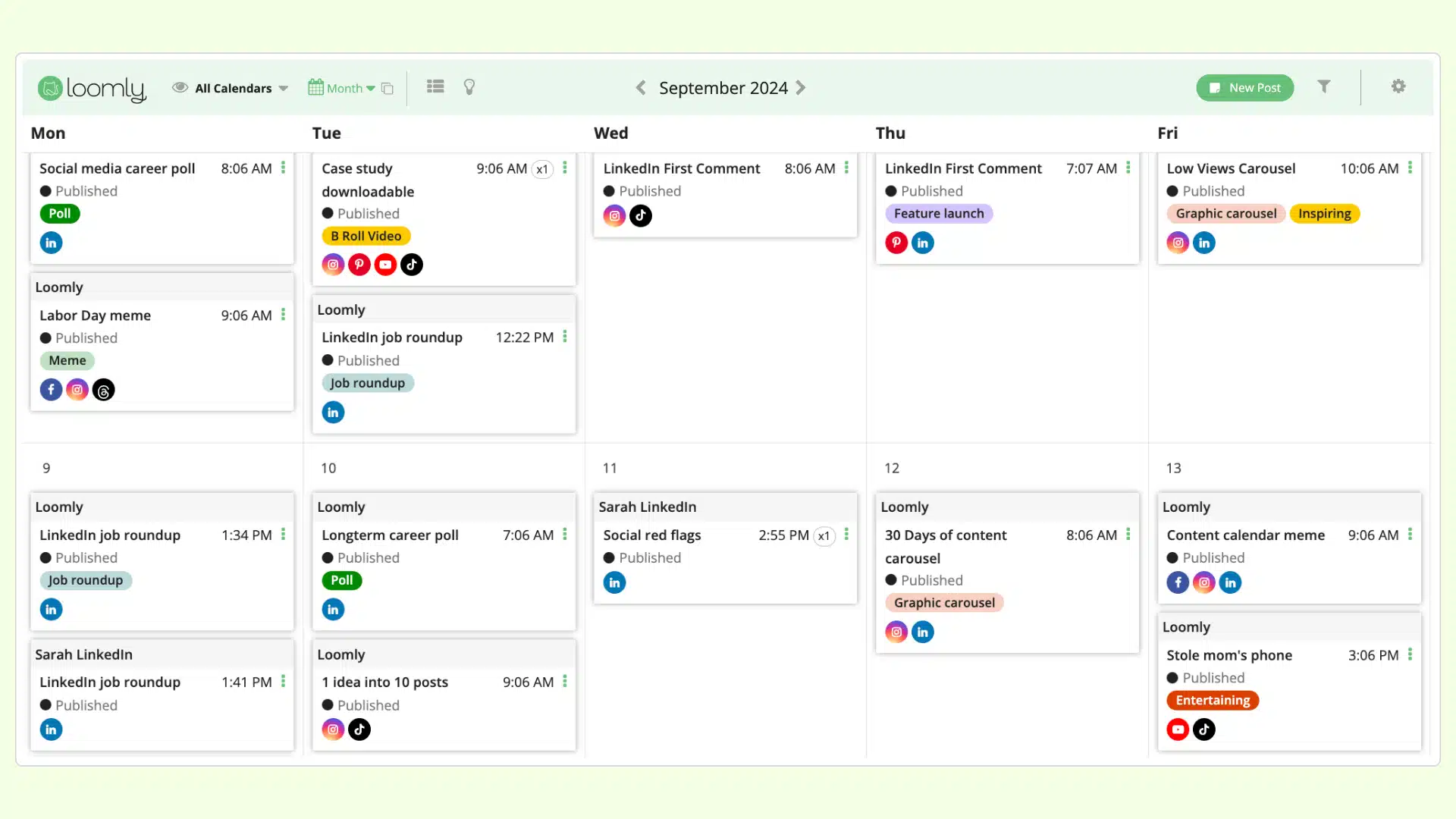
Loomly is like a friendly content coach that keeps you organized and on track. It’s clean, modern, and incredibly structured — ideal if you love calendars and workflows.
Why it stands out: Its post ideas, content tips, and automated workflows help teams produce smarter content faster.
Key Features:
- Advanced audience targeting
- Automated optimization suggestions
- Real-time collaboration
- Multi-format scheduling
- Custom workflows
Pros: Intuitive, content-friendly, great for structured teams
Cons: Social inbox isn’t as strong as others
Ideal for: Teams needing organized workflows
Pricing: Mid-range plans with scalable options
4. Agorapulse — Best for TikTok Integration + Unified Inbox
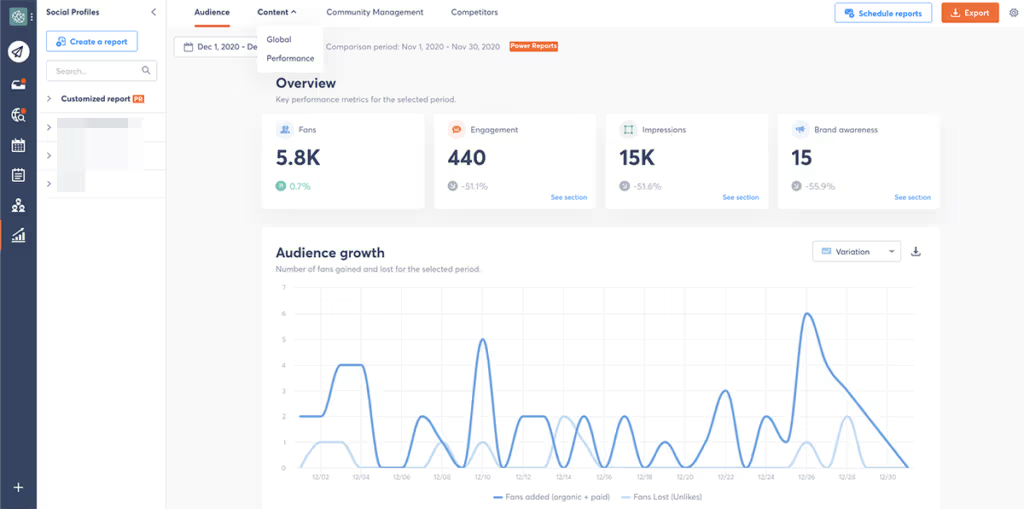
Agorapulse feels like the “grown-up” social media management tool — clean, reliable, and packed with features. But its strongest feature is the unified inbox, especially if you receive a flood of comments across platforms.
Why it stands out: One of the first tools to deeply support TikTok scheduling, analytics, and comment moderation.
Key Features:
- Unified inbox for all platforms
- TikTok auto-publishing with analytics
- Social listening features
- Collaboration tools
- Post performance reports
Pros: Excellent for engagement-heavy brands
Cons: Pricing can add up for large teams
Ideal for: Brands receiving a lot of engagement
Pricing: Premium-tier pricing; worth it for its powerful inbox
5. Sendible — Best for Community Engagement at Scale
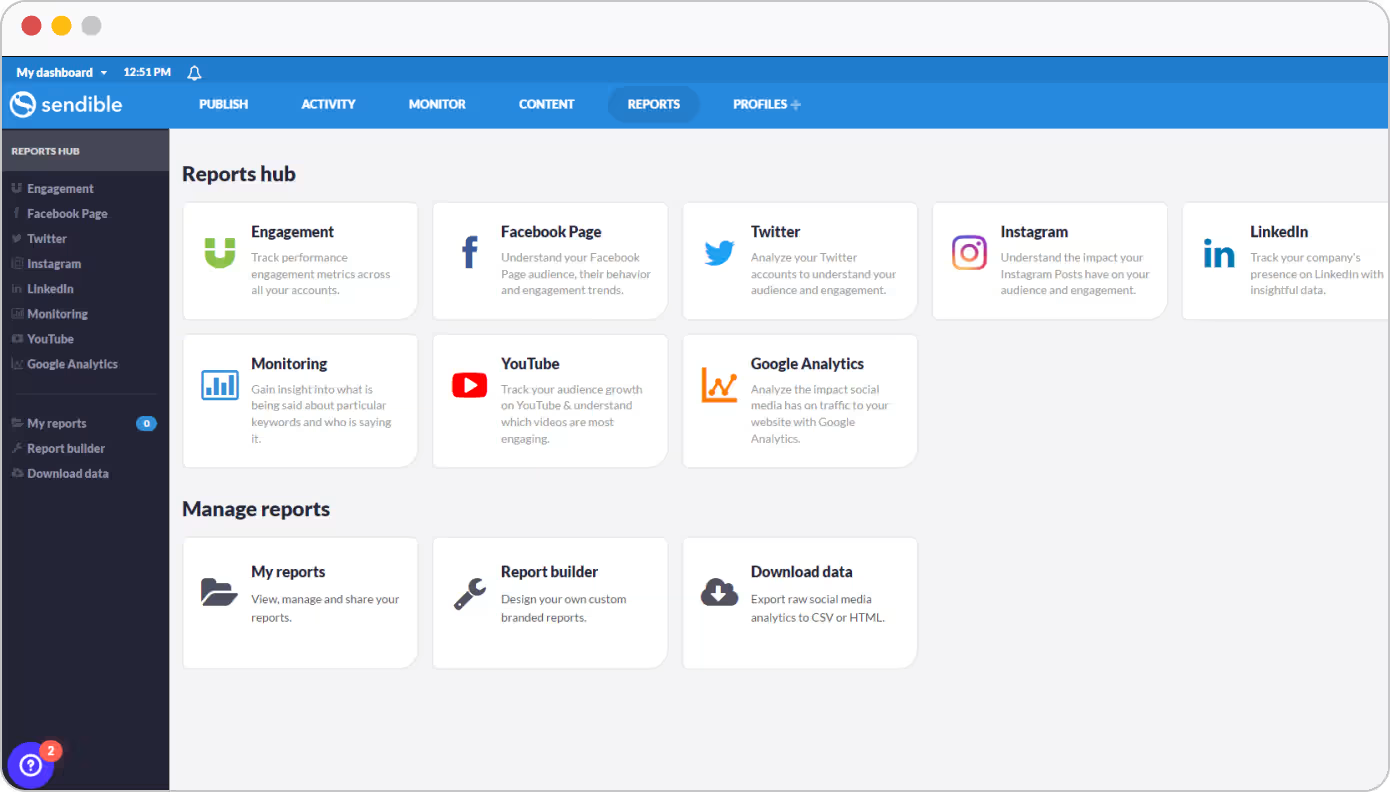
Sendible has long been the go-to for agencies managing multiple clients. Its biggest advantage is how quickly you can engage with comments, mentions, and messages — everything flows smoothly.
Why it stands out: Strong CRM elements + publishing + community management in one dashboard.
Key Features:
- Priority inbox
- Content suggestions
- Canva integration
- Client dashboards
- Smart queues
Pros: Designed for agencies and teams
Cons: Dashboard can feel busy
Ideal for: Agencies, consultants, social media managers
Pricing: Flexible plans for solo users and teams
6. Buffer — Best for AI-Powered Content Creation & Simple Scheduling
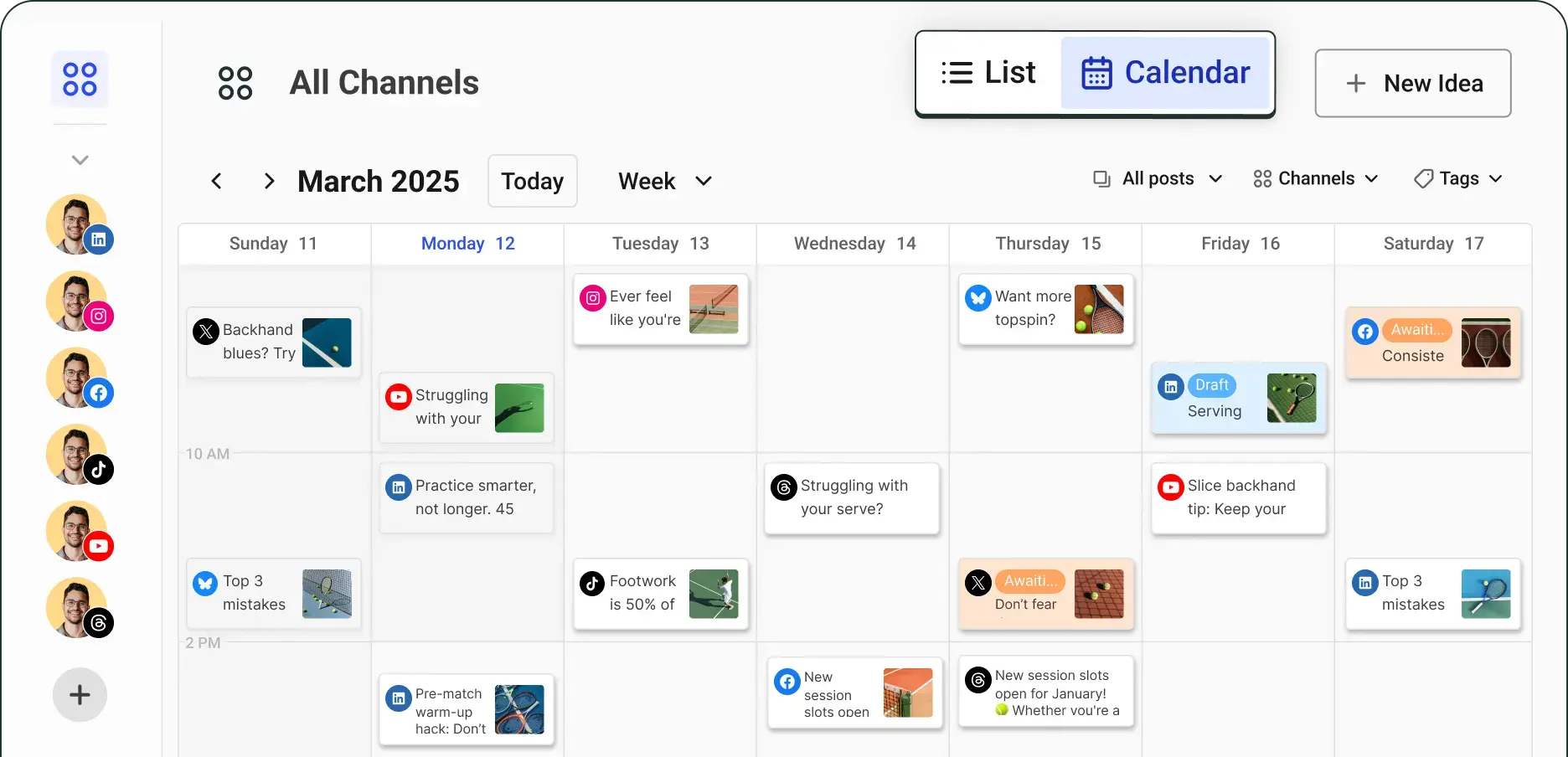
Buffer has been around forever, yet it still feels lightweight and refreshing. With AI now baked in, the tool helps you write captions, generate ideas, and optimize posting times.
Why it stands out: Simplicity + AI content assistance make it perfect for creators and small teams.
Key Features:
- AI caption writer
- Post scheduling across major platforms
- Analytics simplified
- Mobile apps
- Landing page builder for creators
Pros: Clean, simple, beginner-friendly
Cons: Analytics are basic unless you upgrade
Ideal for: Creators, small businesses, solopreneurs
Pricing: Free plan available; paid plans are affordable
7. Sprout Social — Best for Analytics & Identifying Emerging Trends
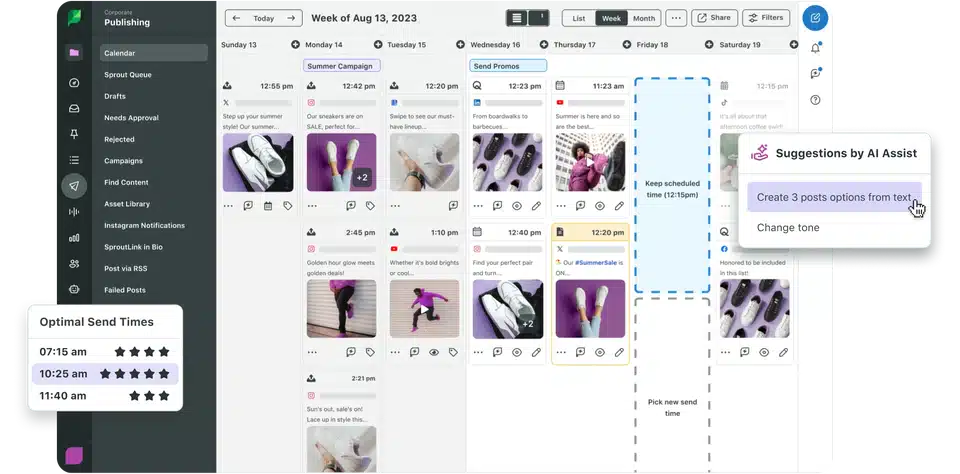
Sprout Social is the “analytics powerhouse” of this list. If you care about real insights — not vanity metrics — Sprout will spoil you.
Why it stands out: Best-in-class analytics + listening tools that reveal trends and audience sentiment.
Key Features:
- Industry-leading analytics
- Advanced listening tools
- Unified inbox
- Collaboration features
- Reporting templates
Pros: Amazing reporting, enterprise-friendly
Cons: One of the most expensive tools
Ideal for: Enterprises, agencies, data-focused teams
Pricing: Premium plans that reflect its advanced capabilities
8. Planable — Best for Multi-Channel Content Collaboration

Planable feels like Google Docs for social media — clean, fast, and perfect for teams constantly reviewing and improving content.
Why it stands out: Real-time collaboration and simple approval flows make it ideal for creative teams and agencies.
Key Features:
- Multi-channel previews
- Commenting and approvals
- Calendar + grid view
- Asset management
- Side-by-side post comparison
Pros: Smooth collaboration, intuitive interface
Cons: Limited analytics
Ideal for: Agencies, creative teams, marketing departments
Pricing: Affordable plans with unlimited collaborators
9. Later — Best for Instagram Auto-Publishing
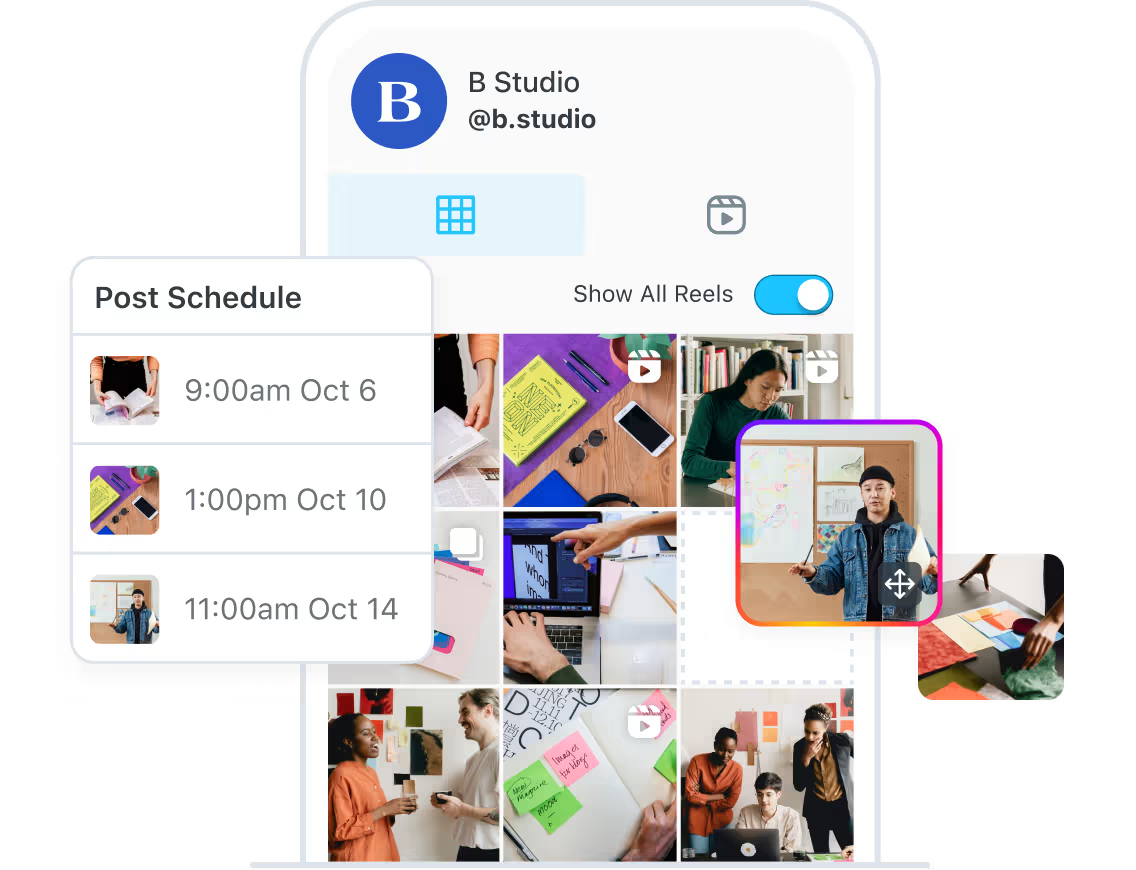
Later built its reputation on Instagram scheduling, and even today, its visual-first approach makes content planning joyful rather than chaotic.
Why it stands out: One of the best tools for Instagram reels, stories, and visual content planning.
Key Features:
- Drag-and-drop calendar
- Visual grid planner
- Auto-publishing for Reels
- Link in bio tools
- Hashtag suggestions
Pros: Excellent for visual brands
Cons: Limited features outside Instagram
Ideal for: Creators, boutiques, photographers, lifestyle brands
Pricing: Free plan available; affordable upgrades for more profiles
10. Brandwatch — Best for Trend Detection & Social Listening
Brandwatch isn’t your everyday scheduler — it’s more like a radar system tracking conversations, trends, and brand sentiment across the internet.
Why it stands out: Market-leading social listening capabilities that help brands stay ahead of trends.
Key Features:
- Real-time listening
- Trend analysis
- Competitor monitoring
- Influencer tracking
- Advanced reporting
Pros: Incredible insights, enterprise-grade features
Cons: Overkill for small teams; pricey
Ideal for: Medium to enterprise brands, research teams
Pricing: Custom-based pricing suited for larger organizations
11. Social Champ — Best for Bulk Scheduling
If your workflow revolves around posting a huge volume of content — say, daily quotes, promotions, product features, or client updates — Social Champ is a lifesaver. It supports bulk uploads, automated scheduling queues, recycling options, and even hashtag manager tools that help maintain consistency. You know what’s nice? Despite its scheduling power, it still feels light and approachable.
Best for: Teams publishing large content volumes
12. Enji — Best for AI-Powered Marketing Calendars
Enji feels like a strategist sitting beside you. Instead of just giving you a calendar, it generates content ideas and outlines using AI, helping businesses that struggle with creativity or planning. It’s structured, thoughtful, and perfect for users who want more guidance than a standard publishing tool can offer.
Best for: Small businesses and early-stage brands needing direction
13. Constant Contact — Best for Email + Social Media Combo
If you want your email marketing and social posting to live together, Constant Contact brings them under the same umbrella. It’s not as sophisticated as the high-end social media platforms management tools, but it’s excellent for campaigns that move audiences between email and social.
Best for: Businesses prioritizing integrated email + social workflows
14. Thryv — Best for Outsourcing Social Media Content Creation
Thryv is the “done-for-you” option. Instead of just giving you tools, it offers outsourced content creation and publishing. That means small businesses with no dedicated marketing person can still maintain a professional presence online.
Best for: Local businesses wanting hands-off social media management
15. HeyOrca — Best for Large Teams & Approvals
HeyOrca is built for agencies managing endless client approvals. Its calendars are clean, visual, and easy for clients to review. You can comment, revise, approve, or reject posts without long email threads — honestly, this alone saves hours.
Best for: Agencies juggling multiple client calendars
16. CloudCampaign — Best White-Label Option for Agencies
If you run an agency and want everything branded under your name, CloudCampaign is perfect. From white-labeled dashboards to client reporting and automated workflows, it feels like having your own custom-built social media platform.
Best for: Agencies wanting seamless client-facing branding
17. MeetEdgar — Best for Evergreen Queues & A/B Testing
MeetEdgar is quirky in the best way. Instead of focusing on everyday publishing, it helps you build long-term content libraries that automatically recycle evergreen posts. It even rotates variations to see what works best — almost like a tiny built-in social media scientist.
Best for: Creators, coaches, and small businesses needing evergreen automation
18. HighLevel — Best for Multi-Channel Engagement Tracking
HighLevel’s core strength isn’t just social scheduling — it ties together CRM, email, messages, funnels, and social interactions. If your customer journey spans several channels, this tool gives you a fuller picture than traditional social media scheduling tools.
Best for: Agencies and service businesses tracking leads + engagement
19. Vista Social — Best for Small Teams
Vista Social is surprisingly robust for its price. You get scheduling, analytics, engagement tools, AI caption help, and even TikTok auto-publishing. It’s clean, modern, and perfect for new teams who want something professional without the usual price tag.
Best for: Small teams starting social media management
20. Iconosquare — Best for Visual Content Analytics
If Instagram or visual branding is your core focus, Iconosquare gives you analytics you won’t find elsewhere. It dives deep into engagement, timing, competitor benchmarks, and content formats — especially useful for creators or brands whose success depends heavily on visuals.
Best for: Photographers, lifestyle brands, visual-first creators
Comparison Table: What Each Tool Does Best
| Feature | SocialPilot | Zoho Social | Loomly | Agorapulse | Sendible | Buffer | Sprout Social | Planable | Later | Brandwatch |
|---|---|---|---|---|---|---|---|---|---|---|
| Bulk Scheduling | Yes | Yes | Yes | Limited | Yes | Yes | Limited | Yes | Yes (IG-focused) | No |
| AI Content Creation | Basic | Basic | Yes | No | Yes | Strong | Yes | Limited | Basic | No |
| Hashtag Suggestions | Yes | No | Yes | Yes | Yes | Yes | Yes | No | Strong (IG) | No |
| Unified Social Inbox | Limited | Yes | No | Excellent | Strong | No | Yes | No | No | No |
| Video/GIF Support | Yes | Yes | Yes | Yes | Yes | Yes | Yes | Yes | Yes | No |
| Evergreen/Content Recycling | Yes | Limited | Yes | Yes | Yes | Limited | Yes | No | Limited | No |
| Analytics Depth | Good | Good | Moderate | Strong | Strong | Moderate | Excellent | Basic | Moderate | Excellent |
| Integrations | Wide | Wide | Wide | Wide | Wide | Moderate | Wide | Moderate | Instagram/Pinterest | Very Wide |
| Chrome Extension | Yes | Yes | Yes | Yes | Yes | Yes | No | No | Yes | No |
| Mobile App | Yes | Yes | Yes | Yes | Yes | Yes | Yes | Limited | Yes | Yes |
| Support Quality | High | High | High | High | High | Moderate | High | High | Moderate | High |
| Great for Agencies? | Yes | Yes | Yes | Yes | Yes | No | Yes | Yes | No | Yes |
| Great for Creators? | Yes | Yes | Moderate | No | Moderate | Yes | No | Yes | Excellent | No |
Free vs Paid Social Media Management Tools

Free social media management tools sound great — and honestly, they’re a solid starting point. But here’s the thing: most free plans only work if your needs are simple, your posting volume is low, and you’re not managing multiple clients or brands. Once you start growing, the cracks show pretty quickly.
Still, free tools do have their place. Buffer, Later, and Zoho Social all offer free plans that genuinely help beginners stay consistent without spending a rupee or a dollar.
What Free Tools Usually Include
You typically get:
- Limited number of social profiles
- Basic post scheduling
- Very simple analytics (usually just engagement numbers)
- No collaboration features
- Limited AI assistance
- No bulk scheduling
This works fine if you’re a creator, a solo entrepreneur, or a new business just trying to get a handle on consistent posting.
Where Free Plans Fall Short
Here’s where reality kicks in:
- You quickly hit posting limits
- You can’t schedule multi-platform campaigns properly
- You can’t manage comments/messages from one place
- Reports look basic (not suitable for clients)
- No approval workflows for teams
- No trend insights or advanced analytics
If you care about growth, sooner or later, you’ll feel these limitations. And honestly, time saved from automation usually justifies upgrading.
When Upgrading Makes Sense
You should consider a paid plan if:
- You manage more than one brand
- You post more than a few times per week
- You need analytics to show ROI
- You collaborate with teammates or clients
- You want AI captions or content repurposing
- You’re handling customer messages daily
Paid tools give you long-term stability and far better control over your social media workflow.
Best Free Social Media Management Tools in 2025
If you’re sticking with free for now, here are your strongest options:
- Buffer: Best free scheduler with decent AI features
- Later: Great for Instagram-first users
- Zoho Social: Surprisingly good free tier for small businesses
These tools won’t scale forever, but they make a solid starting point.
Who Each Tool Really Fits
- Creators: Later, Buffer, Planable
- Small Businesses: SocialPilot, Zoho Social
- Agencies: Sendible, Agorapulse, Planable, Sprout Social, Zoho Social
- Enterprise Teams: Brandwatch, Sprout Social, Zoho Social
- Visual Brands: Later, Iconosquare (alternative list)
- Engagement-heavy businesses: Agorapulse, Sendible
Social Media Post Publishing Calendars
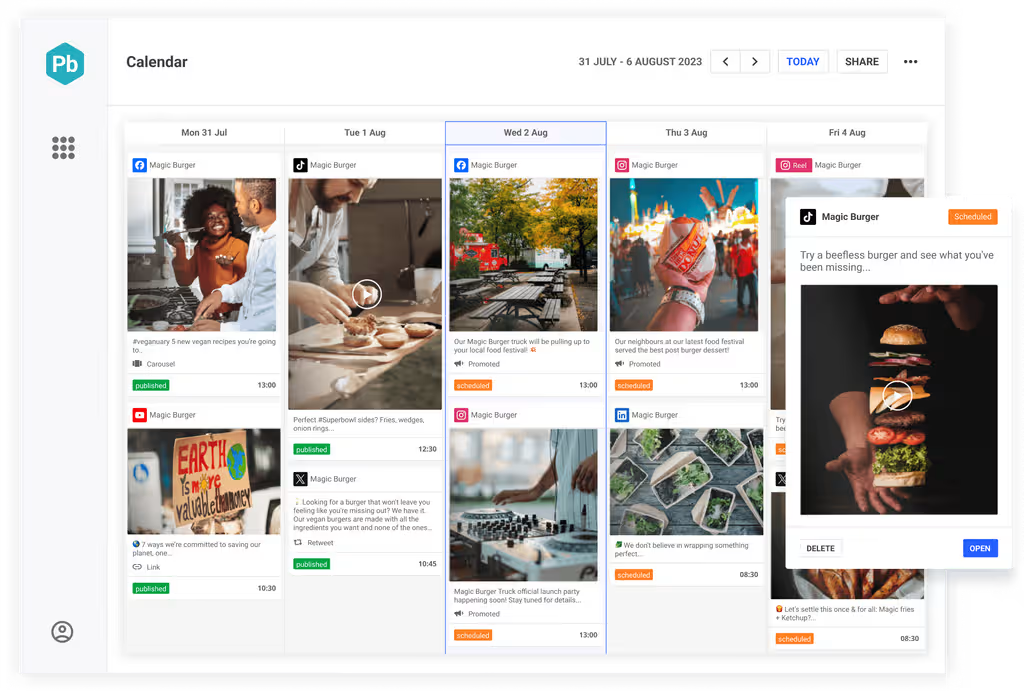
Businesses and individuals need social media to engage in content promotion, community engagement, customer support, and coming out with periodic offers. However, managing so many things would require multiple strategies, and multiple people and also create multiple problems and challenges. The calendar feature in most social media tools allows everyone in the marketing/management team to know what is being scheduled and what others are doing. The calendar helps track a variety of elements like publish time and date and post images, text, campaign goals, campaign category, and much more.
Thankfully each of the social media management tools mentioned above offers the social media post-publishing calendar feature to streamline your social media marketing activities.
Custom Facebook Branding in Social Media Automation
Whenever something is shared on Facebook via third-party tools, the post content is attached to a profile. It can however become quite irritating to have someone else’s a product/brand name in your company profile. Customized Facebook branding is a way of allowing such users to have their own brand name when sharing content. The automation tool allows consistent branding.
Note: After recent updates from various social media platforms, they imposed some restrictions on their APIs. We have sent emails to all these brands for providing the latest update on this feature. We will accordingly update this post soon.
Bulk Scheduling
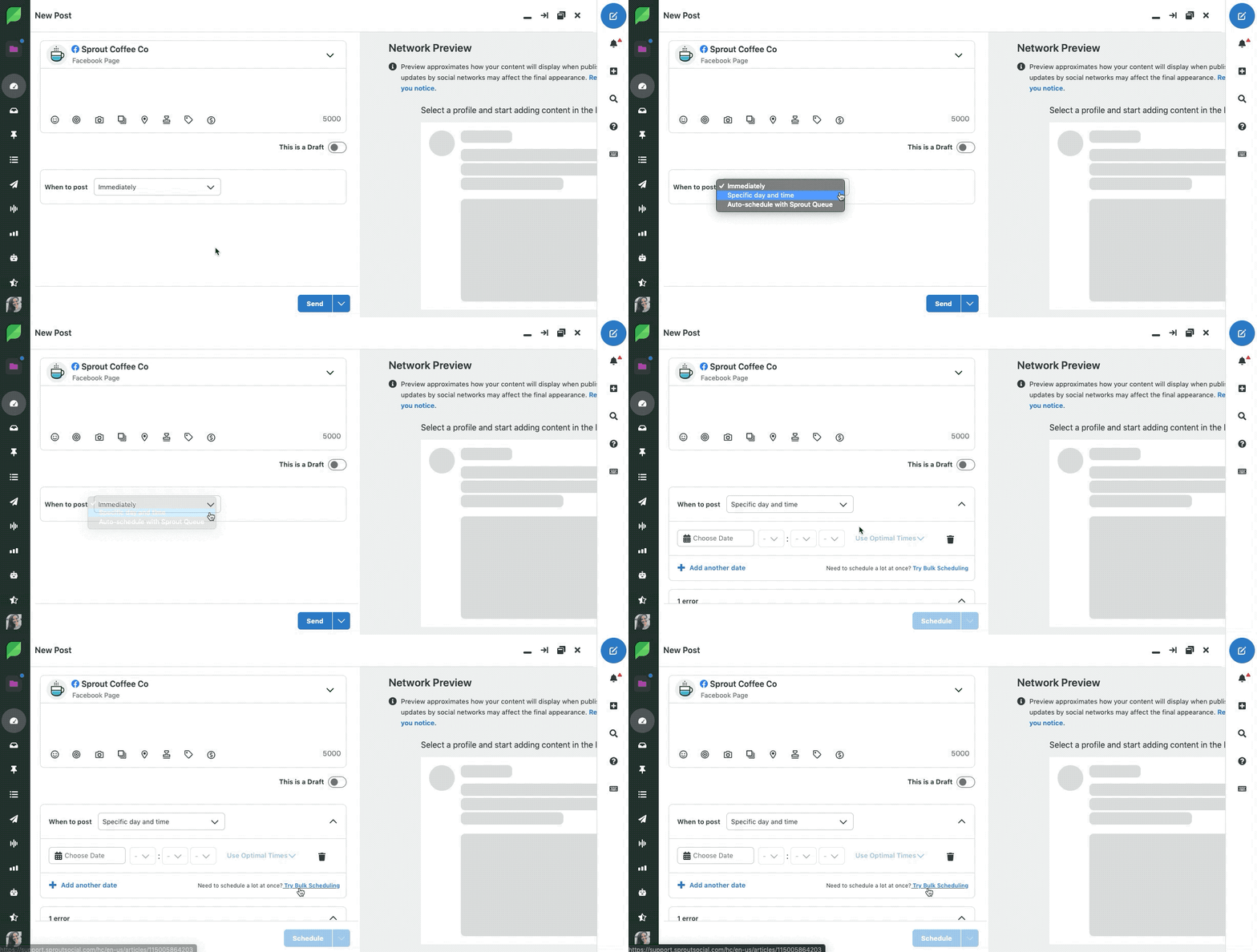
Bulk Scheduling is among the most sought-after feature of a social media management platform. It allows marketing agencies and brand managers to create, schedule & publish multiple posts by using CSV files. Every social media tool might have a different process to create & upload CSV files. Marketers just need to prepare the list of posts in recommended editor and can directly upload them to the social media tool. After uploading the file some tools will show you a preview of all posts and later you can select connected social media accounts where you need to publish the posts.
It is best understood by the situation when you want to post an hourly discount offer on all your social networks. Marketers often use bulk scheduling features for e-commerce stores for better e-commerce social media marketing.
- SocialPilot’s bulk scheduling allows up to 500 posts in advance on all different social media accounts.
- Hootsuite allows the posting of a maximum of 350 scheduled posts across your social networks.
- Meet Edgar also offers Bulk Scheduling features, catering to up to 25 social media accounts and allowing for the scheduling of 5,000 posts in your library.
- Sprout Social also offers bulk scheduling features limited to 350 messages. Here you can use this feature to upload up to 350 messages at a time with tags, links, images everything at one go.
Team and Collaboration
Any business or brand working with an extensive network of enterprises, PR agencies, digital marketing agencies, and consultants always faces complications in its promotions. A thoroughly described team of professionals is the only way out of the mess. Social media management tools help to divide the task between these team members and assign roles for content creation, distribution, and management. This not only makes the task easier and saves time but also allows followers to easily find content.
Thankfully, all the social media management tools here offer a feature for team and collaboration but you will have to subscribe to that specific plan.
Content Suggestion
The content suggestion feature is very crucial when you are managing multiple accounts. Here you can directly find popular content from all different categories and directly schedule to your account with a single click. Here is a good example from Sprout’s Social content suggestion feature.
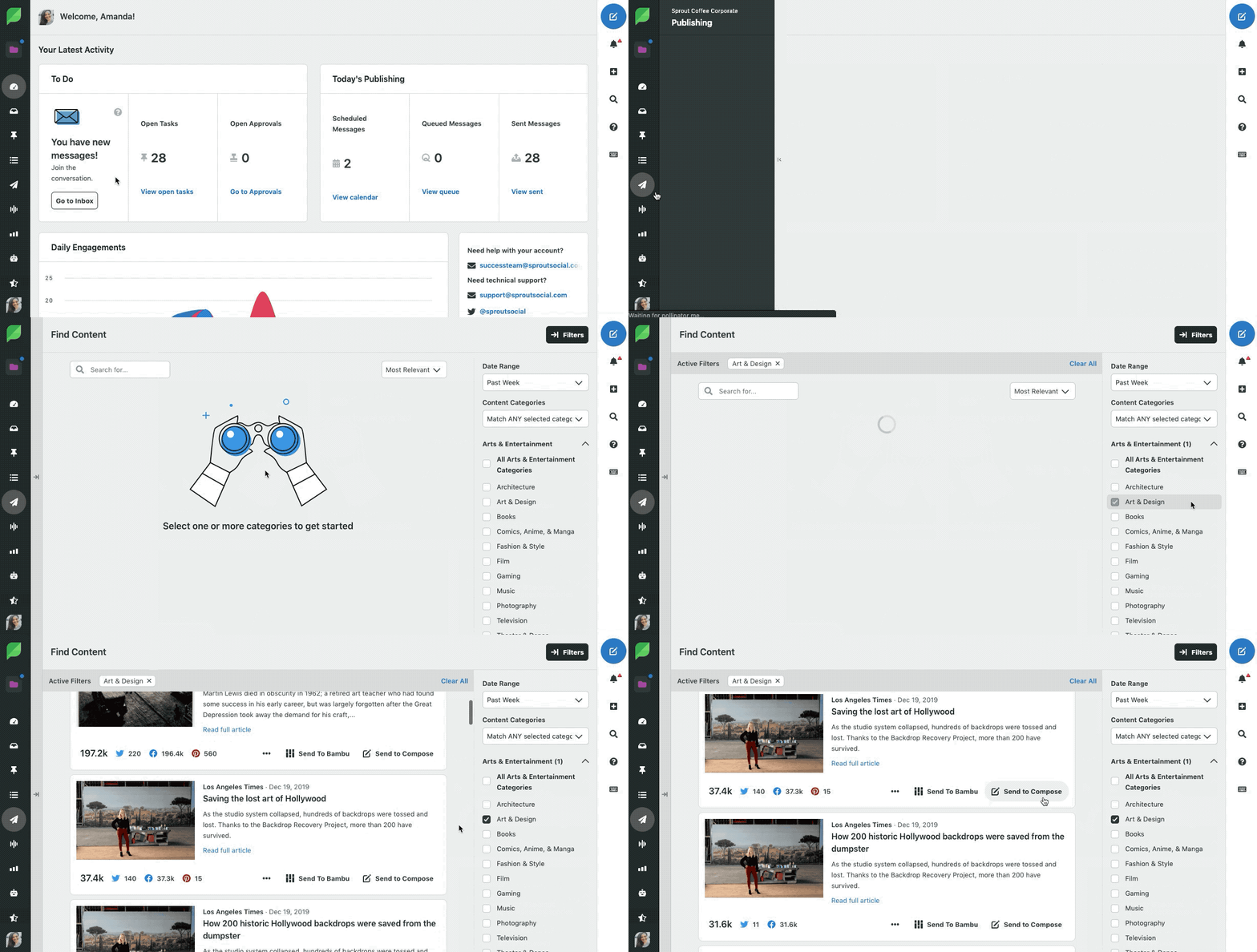
The aim of every brand and business in its social profile should be about sharing more relevant, interesting, and unique content. But, it can be a tricky task to scoop out such updates. Well, social media management tools offer a feature called “suggestion” that finds interesting feeds from across the networks and allow marketing managers to work on them. This really does make the take easier if you are looking to make an active and engaging presence.
SocialPilot, Bugger, Hootsuite, Agora Pulse, Sendible, Crowdfire, eClincher, Sprout Social and Meet Edgar offer content suggestions feature.
Browser Extension / Link Shortening
In special cases like Twitter, the browser URL can create a problem when you are seeking to share a link across your social profiles. The browser extension and link-shortening features allow you to lengthen or shorten these URLs by attaching your bit.ly or Google accounts.
SocialPilot, Buffer, Hootsuite, and Sprout Social does an amazing job of a browser extension and link shortening however, you will miss out on this if you are using Mavsocial. Meet Edgar doesn’t have any default link-shortening feature so you need to connect your bit.ly account to shorten links and track them.
RSS Feed
Feed automation has always been an exciting feature of social media management tools. They keep your social profiles active by attaching real-time updates from your blogs and websites. Social marketers for brands can control their feeds and the way they appear on social networks. RSS Feed management is one of the most helpful features for agencies that are working with several networks and blogs.
SocialPilot offers both automated and manual setups for RSS feed management. With Buffer, the process is completely manual and with Hootsuite, it is completely automated. Mavsocial and Meet Edgar fall behind in this feature with little or no support.
Recently, we got the mail from one of the popular RSS Automation tool Twitterfeed that they are retiring after 31st Oct. After reading that news you might be interested in alternatives to Twitterfeed and these tools helps you to automate your social media posts via the RSS Feed automation feature.
Video Uploader
Video is another form of content that is quite popular with brands across the globe. The support for video content is however offered only by SocialPilot, Sprout Social, Buffer, Hootsuite, and Mavsocial. If you are looking forward to making video content an integral part of your social marketing Meet Edgar wouldn’t be the best tool.
GIF Support
GIF is a special image format where 2 or three images are played inside a single image file to say more. It is best for small advertisements and animations. Offered as an image format, all the above social media management tools support GIF uploads.
Social Media Account Performance Analytics
Social Analytics is again a very important feature when it comes to successful social marketing. Analytics refers to the feedback on the success, reach, and failure of various marketing strategies and campaigns. It’s always an advantage to know how many people you had been able to reach with a particular campaign and what type of content brings you more popularity.
Such social media analytics is offered by Buffer, Hootsuite, SocialPilot, SproutSocial, Mavsocial, and Meet Edgar.
Final Words
Finding the right social media management tool in 2025 isn’t about choosing the one with the longest feature list — it’s about choosing the one that fits your workflow, your budget, and the pace at which your brand is growing. Whether you’re a creator trying to stay consistent, a small business juggling multiple roles, or an agency managing dozens of clients, the “best” tool is simply the one that helps you work smarter and breathe a little easier.
Disclaimer: This post is updated periodically and may miss some of the features being offered by the respective social media brand. It may happen that the information in this article is not 100% correct or outdated, considering the rapid change in the functionality of the brand. If you want to suggest any missing parts in this article, please write to us here in the comments or through our contact form. We will modify the content by reviewing your suggestion.
FAQs on Social Media Management Tools:
There isn’t one “best” tool for everyone, but top choices include SocialPilot for small businesses, Zoho Social for teams, Buffer for creators, Agorapulse for engagement, and Sprout Social for advanced analytics. The best tool depends on your workflow and budget.
Buffer, Zoho Social, and Later offer the strongest free plans in 2025. They support basic scheduling and limited analytics, making them ideal for beginners or small brands posting a few times per week.
Key features include: Scheduling & bulk uploads, AI content writing, Analytics & reporting, Social inbox, Collaboration and approvals, Multi-channel support, Integrations with TikTok, YouTube, Pinterest, etc. Choose based on your actual workflow needs.
Yes — most tools offer insights into engagement, reach, audience behavior, and best posting times. Tools like Sprout Social and Brandwatch provide advanced analytics for trend detection and deeper reporting.
Later is the top choice for Instagram due to its visual planner, link-in-bio features, hashtag tools, and auto-publishing for reels, stories, and carousel posts.
Agorapulse offers the best TikTok publishing and analytics support, along with comment moderation and performance insights for TikTok creators and brands.
Yes, but indirectly. They help you stay consistent, analyze top-performing content, find trends, and manage engagement efficiently — all of which contribute to steady growth when combined with good content.
Zoho Social and Planable are excellent for remote teams because they offer collaboration tools, content approvals, version control, and shared calendars.
Most tools — including SocialPilot, Buffer, Sendible, and Zoho Social — allow multi-platform scheduling. However, features vary. Some platforms (like TikTok or Instagram Stories) may require direct publishing or app confirmation depending on the tool.